
Décor de la chambre
Création d'affiches et de décorations murales
Les affiches et les décorations murales peuvent contenir plus de détails que les vêtements, mais elles nécessitent néanmoins une grille propre. Les meilleurs résultats proviennent d'un recadrage serré, du choix d'une taille de grille adaptée au sujet et de la simplification des couleurs avant la copie.
Vérifié par Living the Grid editor testing - Dernière mise à jour
Ce que couvre ce guide
Poster and wall decoration pixel grids turn portraits, scenes, signs, and room art into structured Tomodachi Life copying guides. They can use more detail than clothing grids, but still need tight crops, readable contrast, simplified colors, and an export format that is practical to follow.
Guide Images
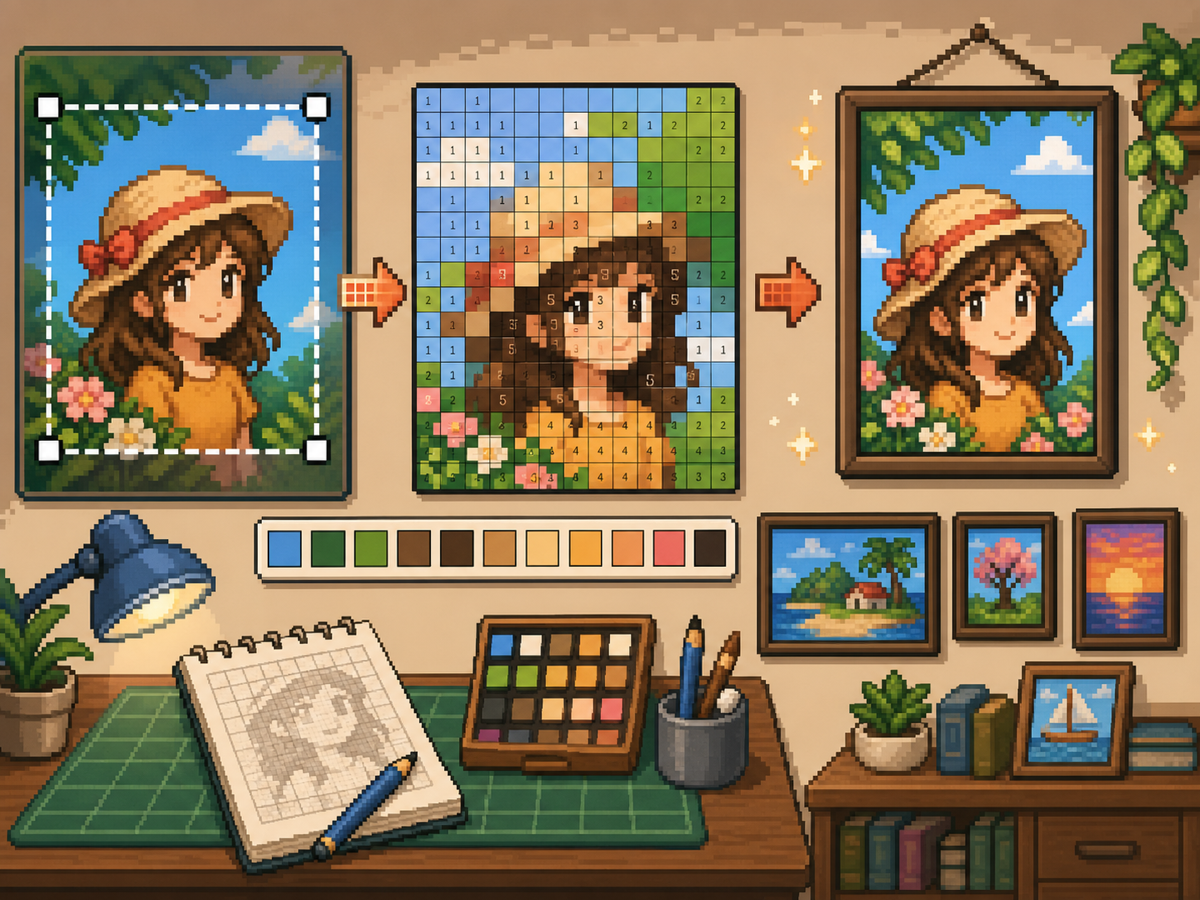
Flux de travail étape par étape
- Recadrez jusqu'à la forme finale de l'affiche. Supprimez l'arrière-plan supplémentaire avant la conversion afin que la grille se concentre sur l'illustration et non sur les marges vides.
- Testez 32x32 et 48x48. Utilisez le format 32 x 32 pour les affiches audacieuses et le 48 x 48 pour les portraits, les scènes ou les dessins comportant des détails ressemblant à du texte.
- Nettoyez le bruit de couleur. Les affiches montrent souvent des dégradés et des ombres. Réduisez les zones bruyantes pour que le motif final soit pratique à copier.
- Exportez les deux versions. Utilisez le motif numéroté pour la copie et la grille simple comme contrôle visuel rapide.
Choix de réseau et compromis
| Choix | Idéal pour | Compromis |
|---|---|---|
| 24x24 | Simple signs, icons, and bold room decorations | Fast to copy, but not enough room for faces or text. |
| 32x32 | Most posters, portraits, and wall art with clear subjects | A strong balance between readable detail and effort. |
| 48x48 | Detailed scenes, portraits, and TV-like art panels | Best detail, but noisy source images require more cleanup. |
Préparation de l’image de l’affiche
Une bonne source d’affiches a un point focal clair. Si l'image originale a un arrière-plan chargé, recadrez-la ou simplifiez-la avant de la télécharger.
Le texte est difficile à conserver avec des grilles de petite taille. Si le texte est important, utilisez une grille plus grande ou remplacez le texte par une forme de bloc plus simple.
Conseils de nettoyage de décoration murale
Utilisez le sélecteur pour échantillonner les couleurs proches et repeindre les cellules isolées qui n'aident pas l'image. Le bruit isolé est l’un des moyens les plus rapides de donner à une affiche un aspect désordonné.
Lorsque vous copiez le motif, marquez les lignes ou les blocs terminés en dehors du jeu afin de ne pas répéter ou sauter de cellules.
Choosing a Poster Source Image
A poster can handle more detail than a shirt, but it still needs one clear focal point. Portraits, album-style covers, title cards, and simple room art usually work better than busy screenshots.
If the original image has text, decide whether the text really needs to be readable. Large block letters can survive at 48x48, but small captions usually become noise and should be removed or redrawn.
Grid Size Decision for Wall Art
Use 32x32 when the poster is built around one bold shape. Use 48x48 when the subject depends on facial features, room details, or a recognizable scene.
Do not choose 48x48 only because it feels more detailed. The larger grid adds 1,280 more cells than 32x32, so it is worth using only when the extra cells make the final image easier to recognize.
Copy Workflow for Larger Posters
For a poster-sized copy session, work in bands. Finish the top quarter, check the silhouette, then move to the next section. This keeps your place and prevents small row offsets from spreading through the whole design.
Keep the plain preview nearby while copying the numbered pattern. The preview helps you notice when a copied row is shifted, while the numbers help with exact color placement.
Example Poster Workflow
For a portrait poster, place the head shape, hair mass, and background color before adding eyes, mouth, or small shadows. If the face looks wrong at that stage, adjust the crop or grid size before investing time in details.
For a sign or title card, block out the largest letters first and simplify any lettering that breaks apart. A readable three-letter mark is better than a longer phrase that turns into scattered pixels.
Erreurs courantes à éviter
- Keeping tiny text. Small lettering usually breaks during conversion. Replace it with block shapes or use a larger grid.
- Leaving busy backgrounds. Background noise steals cells from the subject. Crop and simplify before using the créateur de grille.
- Skipping the plain preview. Check the clean PNG before copying. If it is not readable without numbers, simplify the pattern.
Guides connexes
Foire aux questions
Le 48x48 est-il le meilleur pour chaque affiche ?
Non. Utilisez le format 48x48 pour les affiches détaillées, mais les designs plus simples semblent souvent plus propres et prennent moins de temps au format 32x32.
Un petit texte peut-il survivre à la conversion ?
Généralement non. Les grosses lettres majuscules peuvent fonctionner, mais les petits textes doivent être simplifiés ou supprimés.
Should I remove the poster background?
Remove or simplify the background when it competes with the subject. A cleaner background gives the main shape more grid cells and makes the copy easier.
Why does my poster look noisy?
Poster noise usually comes from gradients, shadows, or busy backgrounds. Reduce the palette, repaint isolated cells, and check the plain preview before copying.