
Riferimento a strumento esterno
Download di TomoTexture per Tomodachi Life: sicurezza, versione e alternative
TomoTexture è uno strumento Windows non ufficiale di Alfonso Mallozzi per sostituire i disegni UGC nei file di salvataggio di Tomodachi Life. Questa pagina spiega cosa fa, cosa supporta, come verificare il download attuale e quando una griglia pixel manuale è l'opzione più sicura.
Verificato da revisione editoriale di Living the Grid - Ultimo aggiornamento
File ufficiale della versione GitHub. Ultimo controllo: 2 giugno 2026.
Cosa tratta questa guida
TomoTexture è separato da Living the Grid. Modifica contenuti locali dei file di salvataggio di Tomodachi Life, mentre Living the Grid crea riferimenti di griglia pixel nel browser ed esportazioni PNG. Usa questa pagina come riferimento di download orientato alla sicurezza, non come copia ufficiale, poi decidi se la modifica dei salvataggi è adatta alla tua configurazione.
Download diretto
Un'utilità Windows per sostituire immagini canvas UGC supportate di Tomodachi Life nei file di salvataggio locali.
Scarica TomoTexture1.1.exe- Versione
- v1.0-beta.2
- Data di pubblicazione
- 2026-04-18
- Piattaforma
- Windows
- Dimensione file
- 34,239,902 bytes
- URL diretto
https://github.com/AlfonsoMallozzi/TomoTexture/releases/download/release/TomoTexture1.1.exe- SHA-256
6743cb5fe3638d4c3b5285e4a0a10c2fbf57a55b2a55a83071fc5c08a0010fa1
TomoTexture è un eseguibile esterno a codice chiuso. Scansiona il file, conserva backup e usalo solo se ti senti a tuo agio nel modificare salvataggi locali del gioco.
Screenshot da GitHub
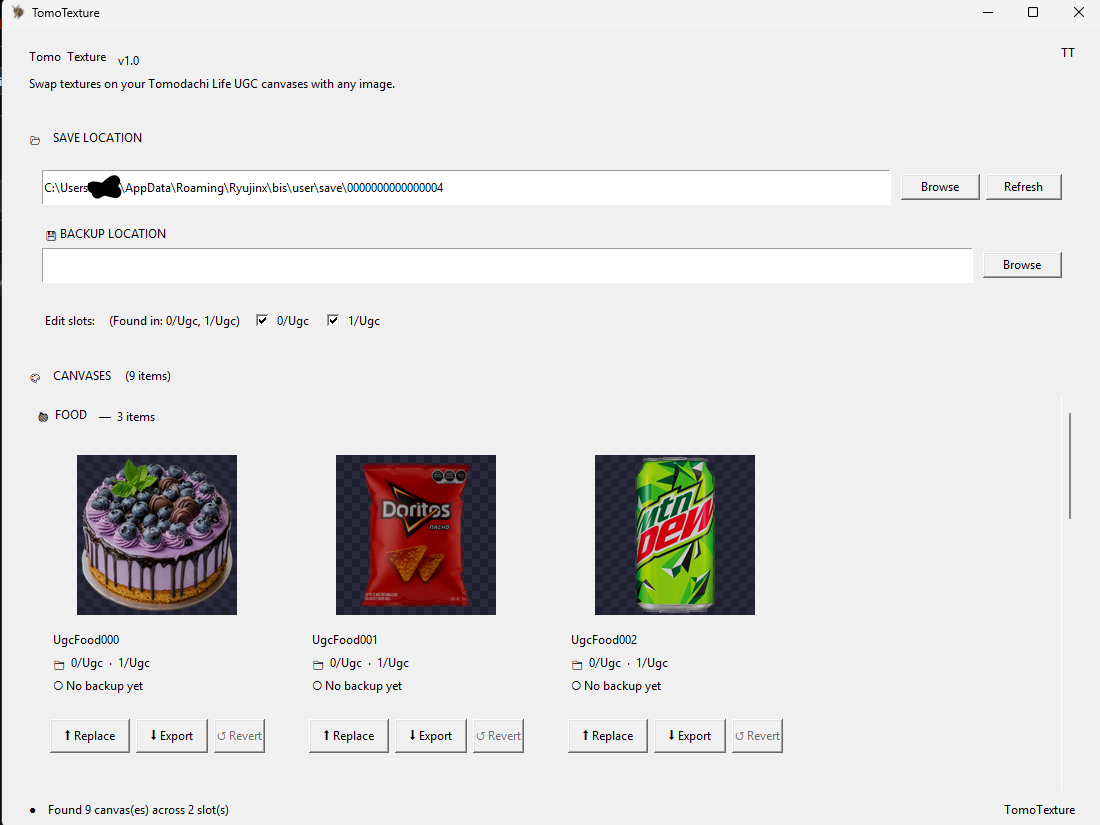
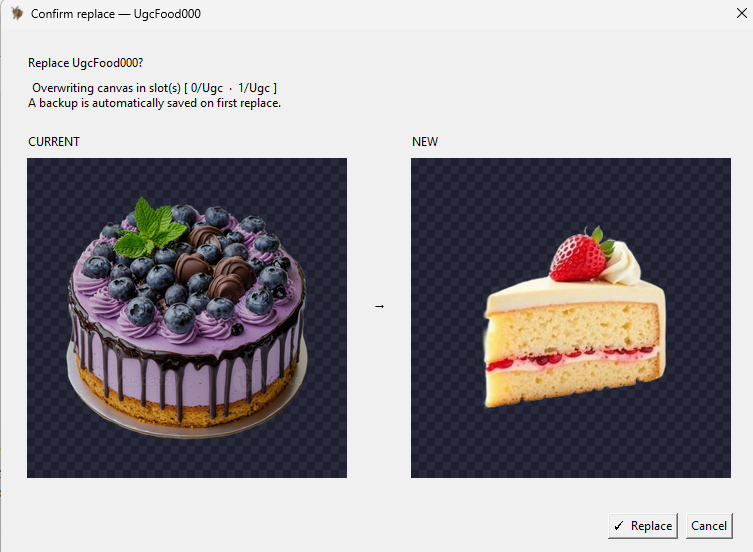
Come scaricare TomoTexture
- Apri la versione ufficiale su GitHub. Consulta prima la pagina dell'ultima versione se vuoi controllare note, screenshot, segnalazioni e se una versione più recente ha sostituito questo download di TomoTexture.
- Scarica l'eseguibile Windows. Il file diretto attuale è TomoTexture1.1.exe. È un eseguibile Windows, non uno strumento per browser né una dipendenza Next.js.
- Verifica il file prima di aprirlo. Conferma il nome del file, il contesto dell'autore e la somma di controllo SHA-256 indicata in questa pagina. Se la somma non corrisponde, non eseguire il file.
- Fai il backup della cartella di salvataggio. TomoTexture modifica il contenuto locale del file di salvataggio. Tieni un backup separato prima di selezionare uno slot o sostituire un disegno.
- Chiudi l'emulatore durante la modifica. Le note di versione avvisano che modificare mentre un emulatore è aperto può creare problemi. Chiudi il gioco, modifica, poi riapri e salva normalmente.
Opzioni di download e compromessi
| Scelta | Ideale per | Compromesso |
|---|---|---|
| Download diretto | Utenti abituali che si fidano già della versione e hanno bisogno rapidamente dell'eseguibile | È il percorso più rapido, ma salta note di versione e segnalazioni più recenti. |
| Pagina della versione GitHub | Nuovi utenti che controllano l'ultima versione, i problemi noti e i dettagli del file | Un clic in più, ma offre più contesto prima di scaricare. |
| Living the Grid | Utenti che hanno bisogno solo di preparare immagini, griglie pixel, guide numerate ed esportazioni PNG | Non modifica i salvataggi e non importa arte direttamente in Tomodachi Life. |
| Flusso manuale con griglia pixel | Giocatori che vogliono copiare in Palette House senza usare un eseguibile | Più sicuro e basato sul browser, ma devi comunque ridipingere il design a mano. |
Cosa supporta TomoTexture
Il README attuale elenca cibi, oggetti e volti come destinazioni canvas UGC supportate di Tomodachi Life. Le note di versione indicano che il supporto per gli oggetti esclude i video.
Questo rende TomoTexture utile per chi vuole un flusso diretto sulle texture del file di salvataggio invece di ridipingere manualmente ogni design in Palette House.
Come si integra con Living the Grid
Living the Grid resta utile prima di usare uno strumento esterno per i salvataggi perché può ritagliare, semplificare, ridurre i colori e visualizzare un'immagine come pixel art. Usa il Creatore di griglie quando ti serve un riferimento pulito prima di provare un flusso diretto sui file di salvataggio.
Se vuoi solo un flusso sicuro nel browser, resta con il Creatore di griglie ed esporta riferimenti PNG numerati. Se vuoi sostituire direttamente un file di salvataggio, TomoTexture è lo strumento Windows separato da valutare.
Note su sicurezza e fonte
Il repository GitHub non pubblica il codice sorgente dell'applicazione. Tratta l'eseguibile come software di terze parti, non come libreria open source, e scaricalo solo dai file della versione GitHub dello sviluppatore.
L'URL di download diretto punta al file GitHub controllato il 2 giugno 2026. Consulta la pagina della versione se vuoi confermare l'esistenza di una versione più recente, leggere le segnalazioni attuali o confrontare eventuali somme di controllo pubblicate per quella versione.
Download ufficiale, copia o guida?
Living the Grid non ospita una copia di TomoTexture, non distribuisce un installer riconfezionato e non modifica l'eseguibile. Il pulsante di download ti porta al file GitHub originale, così puoi controllare personalmente origine, nome del file, note di versione e contesto degli avvisi del browser.
Questa distinzione conta per sicurezza e intento di ricerca: questa è una guida di riferimento per il download di TomoTexture, non il sito ufficiale di TomoTexture. Se vuoi solo pianificare da immagine a griglia, usa il Creatore di griglie nel browser invece di installare un eseguibile Windows.
Quando usare TomoTexture invece di una griglia manuale
Usa TomoTexture solo quando l'obiettivo è la sostituzione diretta del file di salvataggio e sai gestire i file dell'emulatore. Non serve a chi vuole solo un riferimento numerato, un piano palette o un'esportazione PNG pulita.
Per i primi tentativi, prova con una copia di salvataggio sacrificabile e un'immagine semplice prima di sostituire qualcosa di importante. Un design piccolo e ad alto contrasto è più facile da verificare di una foto dettagliata e rende più evidenti errori di file o slot.
Lista di controllo prima del download
Apri la pagina dell'ultima versione, confronta il nome del file, annota la data di pubblicazione e salva un backup pulito prima di eseguire il file. Tieni il download originale in una cartella e il backup del salvataggio in un'altra, così potrai distinguerli dopo.
Se Windows, il browser o un antivirus segnala il file, fermati e controlla la cronologia delle segnalazioni GitHub prima di continuare. Un avviso non significa sempre che il file sia pericoloso, ma è un motivo per rallentare e verificare la fonte.
Errori comuni da evitare
- Trattarlo come parte di Living the Grid. TomoTexture è creato da uno sviluppatore separato e funziona fuori da questo sito. Living the Grid non ospita, non replica, non modifica e non esegue il file.
- Saltare i backup. Modificare file di salvataggio è più rischioso che esportare una reference PNG. Tieni una cartella di backup prima di sostituire qualsiasi canvas UGC.
- Ignorare la pagina della versione. Il link diretto è comodo, ma note di versione e segnalazioni possono cambiare. Controllale prima di usare una build per la prima volta.
Guide correlate
Domande frequenti
TomoTexture fa parte di Living the Grid?
No. TomoTexture è uno strumento Windows esterno di Alfonso Mallozzi. Living the Grid fornisce solo informazioni, un link diretto alla versione GitHub e strumenti di preparazione immagini nel browser.
Qual è il link diretto per scaricare TomoTexture?
Il file GitHub diretto attuale è TomoTexture1.1.exe. Controlla la pagina dell'ultima versione se vuoi verificare versioni più nuove, note di versione, segnalazioni o dettagli della somma di controllo prima di scaricare. TomoTexture1.1.exe su GitHub Pagina dell'ultima versione
TomoTexture funziona nel browser?
No. Il file della versione attuale è un eseguibile Windows. Non è una web app e non può essere eseguito dentro l'editor di Living the Grid.
Living the Grid è il sito ufficiale per scaricare TomoTexture?
No. Questa è una pagina di riferimento indipendente che rimanda al file GitHub dello sviluppatore. Living the Grid non distribuisce un proprio installer di TomoTexture.
Dovrei comunque usare Living the Grid?
Sì, se vuoi preparare un'immagine sorgente, ridurre i colori, vedere un'anteprima pixel art o esportare un riferimento manuale. TomoTexture serve ai flussi di sostituzione diretta del file di salvataggio.
Cosa devo fare prima di sostituire un disegno?
Crea un backup separato, chiudi l'emulatore, prova con un'immagine semplice e conserva il file originale finché non hai riaperto il gioco e confermato che la sostituzione funziona.
Perché questa pagina rimanda a GitHub invece di ospitare il file?
Il riferimento più sicuro è il file di versione dello sviluppatore. Living the Grid non replica né modifica l'eseguibile, così gli utenti possono controllare la pagina originale della versione e la cronologia delle segnalazioni.