
Schermo TV art
Guida alla Pixel Art sullo schermo TV
La grafica dello schermo TV può gestire più dettagli rispetto alle icone minuscole, ma beneficia comunque di un forte contrasto e di un'attenta pulizia. Una griglia di pixel numerati semplifica la copia di scene, ritratti, intertitoli e piccole immagini decorative.
Verificato da Living the Grid editor testing - Ultimo aggiornamento
Cosa tratta questa guida
TV screen pixel art uses a larger Tomodachi Life pixel grid to recreate scenes, title cards, portraits, and decorative images. The best results come from high-contrast source art, 32x32 or 48x48 sizing, simplified gradients, and a numbered guide you can copy over time.
Guide Images
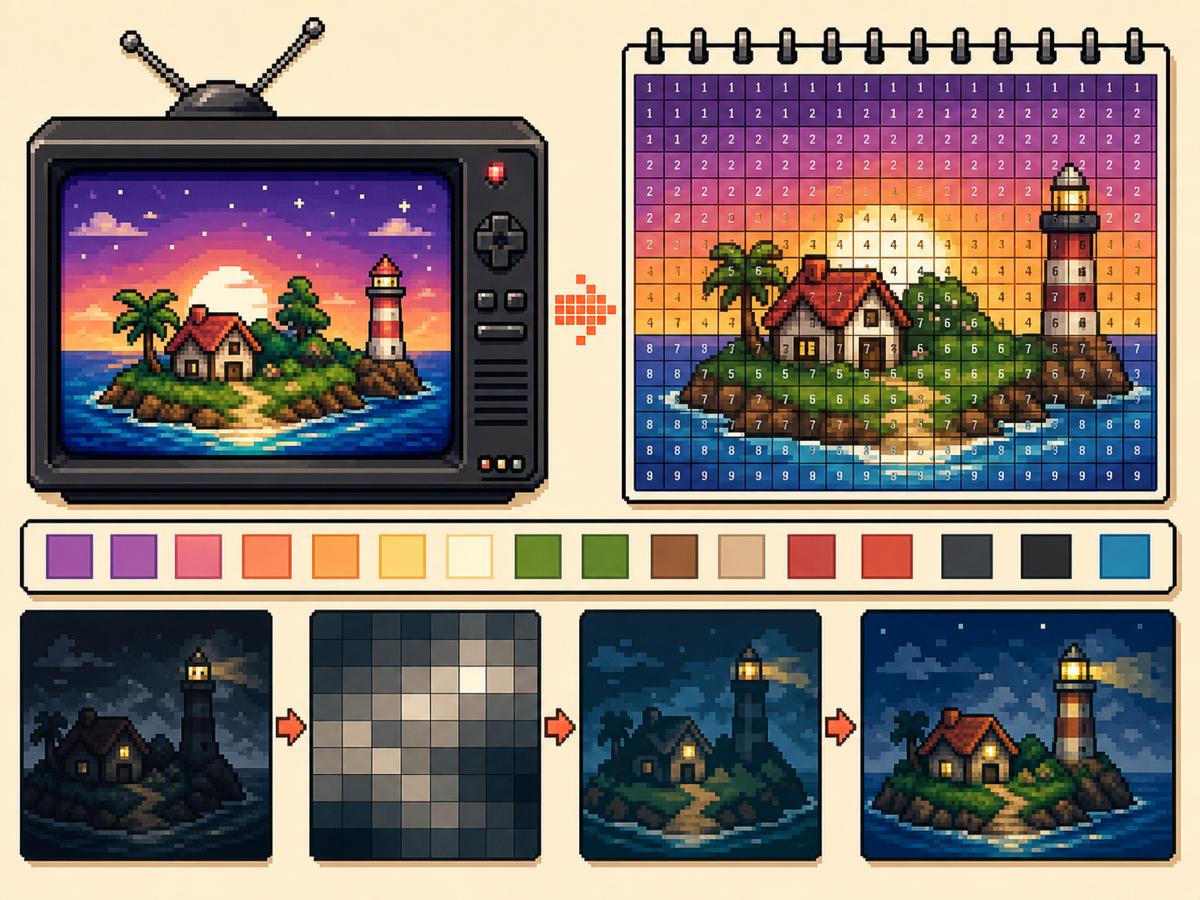
Flusso di lavoro passo dopo passo
- Scegli un'immagine ad alto contrasto. La grafica sullo schermo televisivo è più facile da leggere quando il soggetto è nettamente separato dallo sfondo.
- Usa 48x48 per scene dettagliate. Una griglia più grande offre più spazio a volti, stanze e forme di paesaggio, ma richiede anche più tempo per la copia.
- Semplifica i gradienti. Utilizzare il dithering morbido con parsimonia. Se una sfumatura crea troppe celle alternate, riduci i colori e ridipingi i bordi importanti.
- Esporta un modello numerato. L'esportazione numerata ti aiuta a copiare il disegno con precisione durante una sessione più lunga.
Scelte e compromessi sulla griglia
| Scelta | Ideale per | Compromesso |
|---|---|---|
| 32x32 | Bold title cards, simple logos, and clear TV icons | Faster to copy, but complex scenes lose detail. |
| 48x48 | Portraits, rooms, landscapes, and detailed screen art | More room for detail, but more rows to track. |
| Reduced colors | Dark scenes, gradients, skies, and photos | Less exact color, but cleaner shapes and easier copying. |
I migliori soggetti per la Pixel Art TV
Ritratti, schermate dei titoli, paesaggi semplici e icone grandi di solito funzionano bene. Le scene molto scure e le foto dense spesso necessitano di una pulizia extra.
Se il soggetto dipende da piccoli tratti del viso, utilizza 48x48 e semplifica lo sfondo in modo che il viso riceva maggiore attenzione.
Come evitare l'arte della TV fangosa
I risultati confusi di solito derivano da troppi colori simili. Riduci la tavolozza, ridipingi i contorni importanti e mantieni le luci limitate.
Visualizza l'anteprima della griglia semplice prima di copiare. Se l'anteprima è leggibile senza numeri, il modello numerato dovrebbe essere pratico da ricreare.
Picking the Right Frame
For TV-style art, the frame you choose matters as much as the grid size. Pick a moment with a clear subject, strong lighting, and a simple background rather than a motion-heavy frame full of blur.
Title cards, character close-ups, bright landscapes, and simple UI screens usually convert better than dark action scenes. If a frame already looks busy at thumbnail size, it will probably need heavy cleanup.
Handling Dark Scenes and Gradients
Dark scenes often collapse into a few nearly identical colors. Raise contrast before converting, then reduce the palette so shadows become readable blocks instead of scattered specks.
For skies, lighting, and soft backgrounds, keep dithering light. A small amount can smooth a gradient, but heavy dithering creates alternating cells that take longer to copy than they are worth.
Planning a Longer Copy Session
A detailed 48x48 TV image has 2,304 cells, so treat it like a longer project. Copy in rows or zones, mark completed areas outside the game, and stop at clean checkpoints.
If you notice a row shift late in the process, compare the plain preview against the numbered guide before repainting. Sometimes one corrected boundary fixes the image without redoing a whole section.
Example TV Screen Workflow
For a title screen, copy the background block and main title shape first, then add highlights or small decorative marks. If the title does not read at a distance, simplify the letters before copying the rest.
For a character scene, protect the face and outline first. Background details can be reduced heavily, because the viewer usually recognizes the scene from the character shape and strongest colors.
Errori comuni da evitare
- Using very dark screenshots. Dark images often collapse into similar colors. Raise contrast or choose a brighter frame first.
- Letting gradients dominate. Smooth gradients create many tiny changes. Reduce colors and preserve the important outlines.
- Copying without checkpoints. TV art takes longer. Mark completed rows or blocks outside the game so you can resume accurately.
Guide correlate
Domande frequenti
La grafica dello schermo TV dovrebbe utilizzare 48x48?
Usa 48x48 per immagini dettagliate. Utilizza 32x32 quando il disegno è in grassetto o quando desideri un processo di copia più veloce.
I numeri peggiorano l’immagine finale?
No. Il modello numerato è solo una guida. Puoi anche esportare una semplice anteprima PNG per vedere l'immagine finale senza etichette.
What kind of TV image converts best?
Use a bright frame with one main subject and clear contrast. Dark, blurry, or crowded frames usually need extra editing before they make good pixel art.
How do I avoid losing my place on a 48x48 copy?
Divide the pattern into rows, quarters, or color passes and mark completed areas as you go. The numbered export is easiest to follow when you use visible checkpoints.