
共有ワークフロー
トモダチライフ作品とパレットハウスデザインの共有方法
トモダチライフの共有は、ゲーム内でローカル交換できるものと、プレイヤーがオンラインで記録できるものに分かれます。このガイドでは、作品を準備し、見やすい参照を書き出し、ワンクリック取り込みを約束せずに他のプレイヤーが再現できる情報を添える方法を説明します。
確認者 リビング・ザ・グリッド編集レビュー - 最終更新
グリッドができたら共有パネルまたは書き出しボタンを使います。
このガイドでわかること
トモダチライフ作品の共有は、多くの場合、ゲーム内のローカル無線交換、コミュニティへのスクリーンショットや写真投稿、または PNG グリッド参照、番号付きパターン、メモで作る再現ガイドのいずれかです。リビング・ザ・グリッドは参照と書き出しの流れを支援するもので、Mii データベースや公式アップロードサービスではありません。
Guide Images
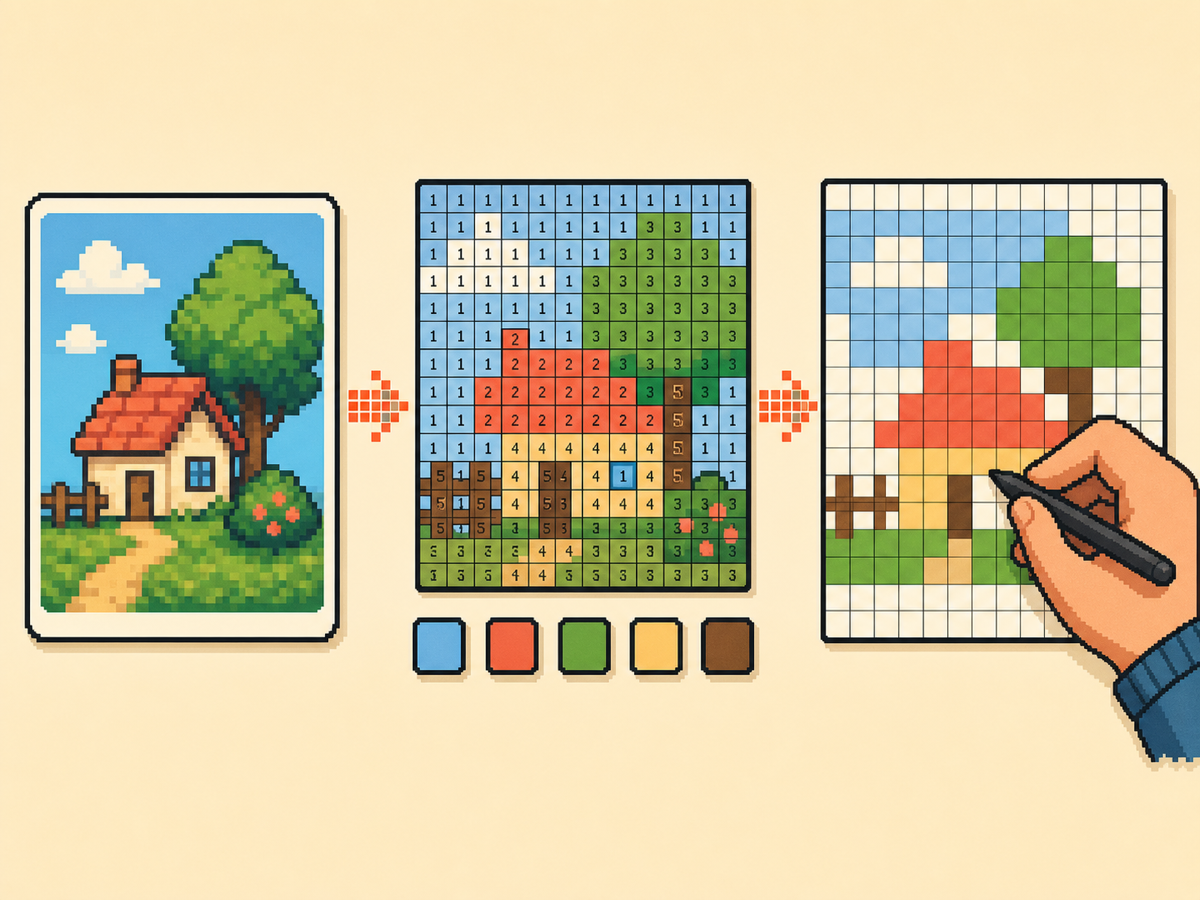
共有しやすい作品の準備方法
- Check whether local play fits. If the other player is nearby and both games are ready, use the official local wireless flow for creations you made on your island. It is the closest in-game sharing path, but it is not an internet upload feature.
- Export a clean visual reference. For online posts, export a PNG grid or plain preview first. This gives people a readable image of the design without needing your original source file.
- Add a numbered pattern. A numbered pattern makes パレットハウス designs easier to recreate because every cell points to a color number. Include it when the design has many similar shades or small details.
- Include setup notes. Mention the grid size, palette mode, color count, and any manual cleanup you made. Those notes help another player rebuild the design instead of guessing from a screenshot.
- Post to the right community. Use communities that allow fan creations, credit source art when needed, and avoid personal images or content you do not have permission to share.
共有方法と制限
| 選択 | 向いている用途 | トレードオフ |
|---|---|---|
| ローカル無線 | Nearby players exchanging creations inside トモダチライフ: 夢のくらし | Requires both players locally and does not create a public online listing. |
| PNG グリッド参照 | Posting パレットハウス designs, custom clothes, posters, food, or object art online | Easy to share, but the receiver still recreates the art manually. |
| 番号付きパターンとレシピカード | Detailed designs that need exact colors, row labels, or rebuild notes | More complete, but slower to prepare than a simple screenshot. |
トモダチShare が扱うもの
トモダチShare is a separate fan site focused on discovering, uploading, and sharing Mii residents. リビング・ザ・グリッド should not present itself as that service or use the トモダチShare name as a page target.
リビング・ザ・グリッドの役割
リビング・ザ・グリッド is useful when the thing you want to share is a custom visual design. It turns source art into パレットハウス friendly references, numbered PNGs, recipe cards, and share links for your own project state.
オンライン投稿に含めるもの
A strong post includes the finished preview, numbered pattern, grid size, palette mode, title, source credit if needed, and a note that the design is meant for manual recreation.
安全性と許可に関するメモ
Do not post private photos, personal information, or uncredited creator work as if it were your own. If a community has rules for custom designs or image uploads, follow those rules before attaching exports.
避けたいよくあるミス
- オンライン取り込みと呼んでしまう。 A PNG export is a reference for manual copying. It does not send art into the game or bypass local play.
- スクリーンショットだけを使う。 Screenshots are good for showing the result, but a numbered grid is much easier for another player to recreate accurately.
- 別サイトのブランド名を狙う。 Mention トモダチShare only when explaining the difference. This page should focus on パレットハウス and creation-sharing workflows.
関連ガイド
よくある質問
これはトモダチShare ですか?
いいえ。トモダチShare は Mii 住民を見つけて共有するための別のファンプロジェクトです。リビング・ザ・グリッドは、パレットハウス風のグリッド参照、PNG 書き出し、番号付きパターン、レシピカードに焦点を当てています。 GitHub でトモダチShare を見る
ゲームからパレットハウス作品をオンライン共有できますか?
The official in-game exchange flow is local wireless. For online communities, share screenshots, exported grid references, numbered patterns, or recreation notes rather than claiming there is an official internet upload. 任天堂のローカルプレイサポート
他のプレイヤー向けの最適な書き出しは?
Use a plain preview for quick inspiration and a numbered pattern when accuracy matters. For detailed art, include the recipe card so the grid size and palette choices travel with the image.
リビング・ザ・グリッドで作品をホストできますか?
No. This project does not include accounts, uploads, moderation, or a community database. It helps you prepare assets that you can post on communities you already use.
元画像を共有すべきですか?
Only share source art when you own it or have permission. In most cases, the generated grid, finished preview, and credit note are enough for a fan creation post.