
外部ツール参照
トモダチライフ向け TomoTexture ダウンロード:安全性、バージョン、代替案
TomoTexture は Alfonso Mallozzi による非公式 Windows ツールで、トモダチライフのセーブファイル内の UGC キャンバス画像を置き換えるためのものです。このページでは、機能、対応範囲、現在のダウンロード確認方法、手作業のピクセルグリッドの方が安全な場合を説明します。
確認者 リビング・ザ・グリッド編集レビュー - 最終更新
公式 GitHub リリースファイル。最終確認日:2026年6月2日。
このガイドでわかること
TomoTexture はリビング・ザ・グリッドとは別のツールです。TomoTexture はローカルのトモダチライフセーブファイルを編集し、リビング・ザ・グリッドはブラウザ上でピクセルグリッド参照と PNG 書き出しを作成します。このページは公式ミラーではなく、安全確認を優先したダウンロード参考として使い、セーブ編集が自分の環境に合うか判断してください。
- バージョン
- v1.0-beta.2
- 公開日
- 2026-04-18
- プラットフォーム
- Windows
- ファイルサイズ
- 34,239,902 bytes
- 直接 URL
https://github.com/AlfonsoMallozzi/TomoTexture/releases/download/release/TomoTexture1.1.exe- SHA-256
6743cb5fe3638d4c3b5285e4a0a10c2fbf57a55b2a55a83071fc5c08a0010fa1
TomoTexture は外部のクローズドソース実行ファイルです。ファイルをスキャンし、バックアップを残し、ローカルのゲームセーブを編集することに納得できる場合だけ使用してください。
GitHub スクリーンショット
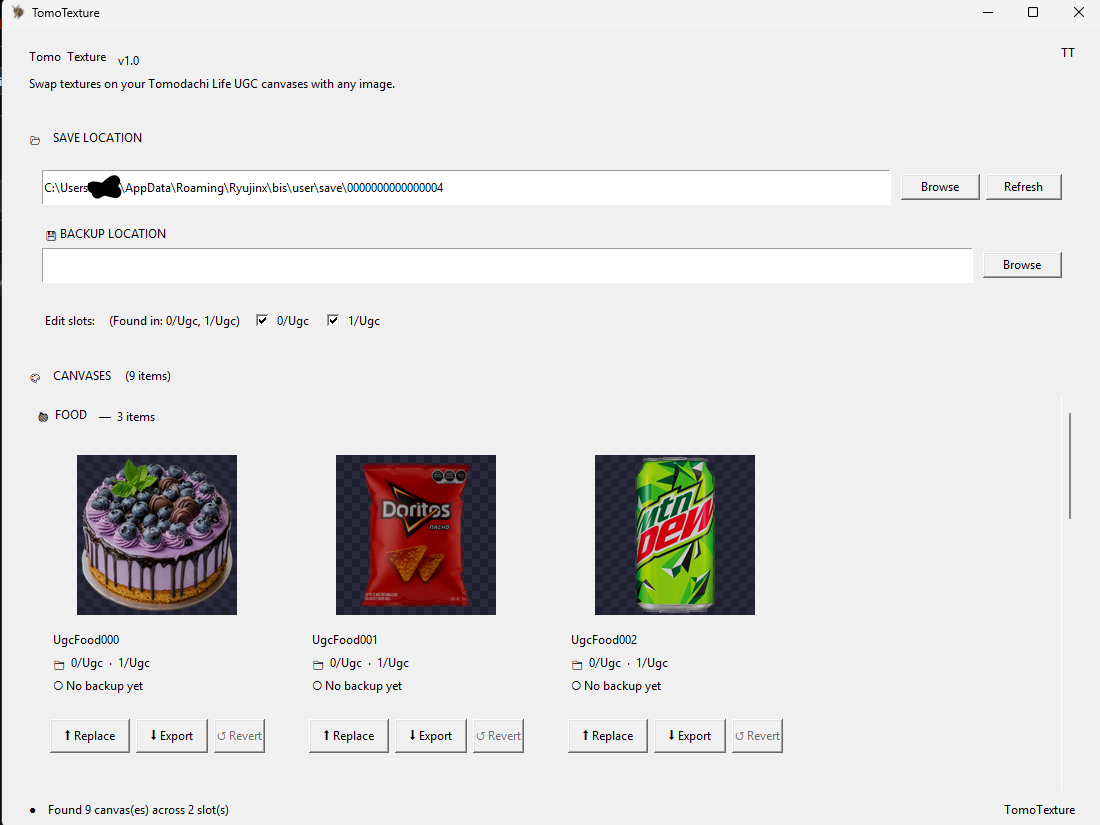
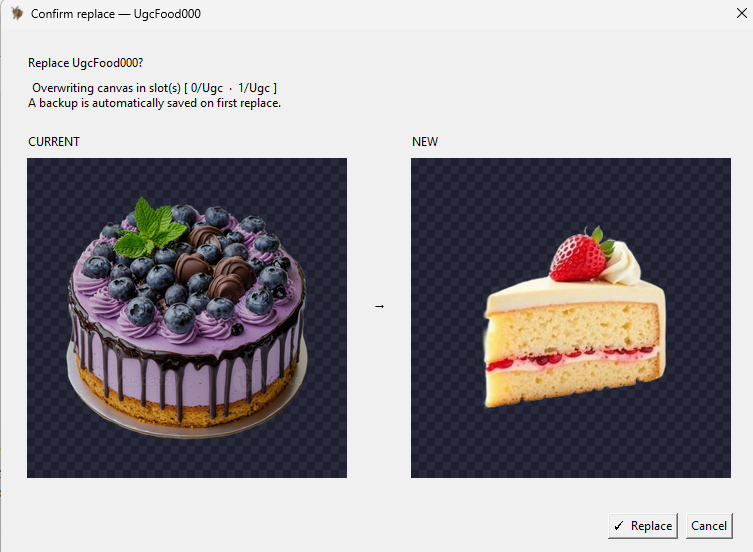
TomoTexture のダウンロード方法
- 公式 GitHub リリースを開きます。 メモ、スクリーンショット、不具合報告、またはより新しいビルドがこの TomoTexture ダウンロードを置き換えていないか確認したい場合は、まず最新リリースページを確認してください。
- Windows 実行ファイルをダウンロードします。 現在の直接ファイルは TomoTexture1.1.exe です。これは Windows 実行ファイルであり、ブラウザツールや Next.js 依存関係ではありません。
- 開く前にファイルを確認します。 このページに記載されたファイル名、公開元の文脈、SHA-256 チェックサムを確認してください。チェックサムが一致しない場合はファイルを実行しないでください。
- セーブフォルダをバックアップします。 TomoTexture はローカルのセーブファイル内容を変更します。スロットを選択したり絵を置き換えたりする前に、別のバックアップを残してください。
- 編集中はエミュレータを閉じます。 リリースノートでは、エミュレータを開いたまま編集すると問題が起きる可能性があるとされています。ゲームを閉じて編集し、その後もう一度開いて通常どおり保存してください。
ダウンロード方法とトレードオフ
| 選択 | 向いている用途 | トレードオフ |
|---|---|---|
| 直接ダウンロード | このリリースをすでに信頼しており、実行ファイルをすぐに入手したいリピーター | 最速ですが、リリースノートや新しい不具合報告を確認しないまま進みます。 |
| GitHub リリースページ | 最新版、既知の問題、ファイル詳細を確認したい初回ユーザー | クリックは一つ増えますが、ダウンロード前により多くの文脈を確認できます。 |
| リビング・ザ・グリッド | 画像準備、ピクセルグリッド、番号付きガイド、PNG 書き出しだけが必要なユーザー | セーブデータの編集やトモダチライフへの直接インポートは行いません。 |
| 手作業のピクセルグリッド手順 | 実行ファイルなしでパレットハウスに写したいプレイヤー | より安全でブラウザ内で完結しますが、デザインは手作業で描き直します。 |
TomoTexture が対応するもの
現在の README では、食べ物、グッズ、顔が対応するトモダチライフ UGC キャンバス対象として挙げられています。リリースノートでは、グッズ対応に動画は含まれないとされています。
そのため TomoTexture は、パレットハウスで各デザインを手作業で描き直すのではなく、セーブファイルのテクスチャを直接扱いたいプレイヤーに向いています。
リビング・ザ・グリッドとの使い分け
外部のセーブファイルツールを使う前でも、リビング・ザ・グリッドは元画像の切り抜き、単純化、減色、ピクセルアートプレビューに役立ちます。セーブファイルを直接扱う前にきれいな参照が必要なときは、グリッドメーカーを使ってください。
安全なブラウザ作業だけでよい場合は、グリッドメーカーで番号付き PNG 参照を書き出してください。セーブファイルを直接置き換えたい場合は、TomoTexture という別の Windows ツールを確認する必要があります。
安全性と入手元のメモ
GitHub リポジトリではアプリケーションのソースコードは公開されていません。実行ファイルはオープンソースライブラリではなくサードパーティソフトとして扱い、開発者の GitHub リリースファイルからのみダウンロードしてください。
直接ダウンロード URL は 2026年6月2日に確認した GitHub リリースファイルを指しています。より新しいビルドの有無、現在の不具合報告、または公開済みチェックサムを確認したい場合はリリースページを見てください。
公式ダウンロード、ミラー、それともガイド?
リビング・ザ・グリッドは TomoTexture をミラーせず、再パッケージしたインストーラーを配布せず、実行ファイルも変更しません。ダウンロードボタンは元の GitHub リリースファイルへ移動するため、入手元、ファイル名、リリースノート、ブラウザ警告の文脈を自分で確認できます。
この区別は安全性と検索意図の両方で重要です。これは TomoTexture ダウンロードの参考ガイドであり、公式 TomoTexture サイトではありません。画像をグリッド化して計画したいだけなら、Windows 実行ファイルをインストールせず、ブラウザのグリッドメーカーを使ってください。
手作業グリッドではなく TomoTexture を使うタイミング
TomoTexture は、目的がセーブファイルの直接置き換えで、エミュレータのファイル管理に慣れている場合だけ使ってください。番号付きの描画参照、パレット計画、きれいな PNG 書き出しだけが必要なプレイヤーには不要です。
最初は重要なものを置き換える前に、使い捨てのセーブコピーと簡単な画像で試してください。小さくコントラストの高いデザインは詳細な写真より確認しやすく、ファイルやスロットの間違いにも気づきやすくなります。
ダウンロード前チェックリスト
最新リリースページを開き、ファイル名を比較し、公開日を控え、実行前にきれいなバックアップを保存してください。後で区別できるよう、元のダウンロードとセーブのバックアップは別々のフォルダに置きます。
Windows、ブラウザ、またはウイルス対策ツールがファイルについて警告した場合は、続行前に止まって GitHub の issue 履歴を確認してください。警告が必ず危険を意味するわけではありませんが、入手元を慎重に確認する理由になります。
避けたいよくあるミス
- リビング・ザ・グリッドの一部として扱う。 TomoTexture は別の開発者が作成しており、このサイトの外で動作します。リビング・ザ・グリッドはそのファイルをホスト、ミラー、変更、実行しません。
- バックアップを省略する。 セーブファイル編集は PNG 参照を書き出すよりリスクがあります。UGC キャンバスを置き換える前にバックアップフォルダを残してください。
- リリースページを確認しない。 直接リンクは便利ですが、リリースノートや不具合報告は変わることがあります。初めてビルドを使う前に確認してください。
関連ガイド
よくある質問
TomoTexture はリビング・ザ・グリッドの一部ですか?
いいえ。TomoTexture は Alfonso Mallozzi による外部 Windows ツールです。リビング・ザ・グリッドは情報、GitHub リリースへの直接リンク、ブラウザ上の画像準備ツールだけを提供します。
TomoTexture の直接ダウンロードリンクはどれですか?
現在の直接 GitHub ファイルは TomoTexture1.1.exe です。ダウンロード前に新しいビルド、リリースノート、不具合報告、チェックサム詳細を確認したい場合は最新リリースページを見てください。 GitHub の TomoTexture1.1.exe 最新リリースページ
TomoTexture はブラウザで動作しますか?
いいえ。現在のリリースファイルは Windows 実行ファイルです。Web アプリではなく、リビング・ザ・グリッドエディタ内では実行できません。
リビング・ザ・グリッドは TomoTexture の公式ダウンロードサイトですか?
いいえ。これは開発者の GitHub リリースファイルへリンクする独立した参考ページです。リビング・ザ・グリッドは独自の TomoTexture インストーラーを配布していません。
それでもリビング・ザ・グリッドを使うべきですか?
はい。元画像の準備、減色、ピクセルアートのプレビュー、手作業用参照の書き出しが目的ならリビング・ザ・グリッドが向いています。TomoTexture はセーブファイルを直接置き換える手順向けです。
絵を置き換える前に何をすべきですか?
別のセーブバックアップを作り、エミュレータを閉じ、簡単な画像でテストし、ゲームを再度開いて置き換えが成功したことを確認するまで元ファイルを残してください。
このページがファイルをホストせず GitHub にリンクする理由は?
最も安全な参照先は開発者自身のリリースファイルです。リビング・ザ・グリッドは実行ファイルをミラーしたり変更したりしないため、ユーザーは元のリリースページと issue 履歴を確認できます。