
TV 画面アート
TV 画面ピクセルアートガイド
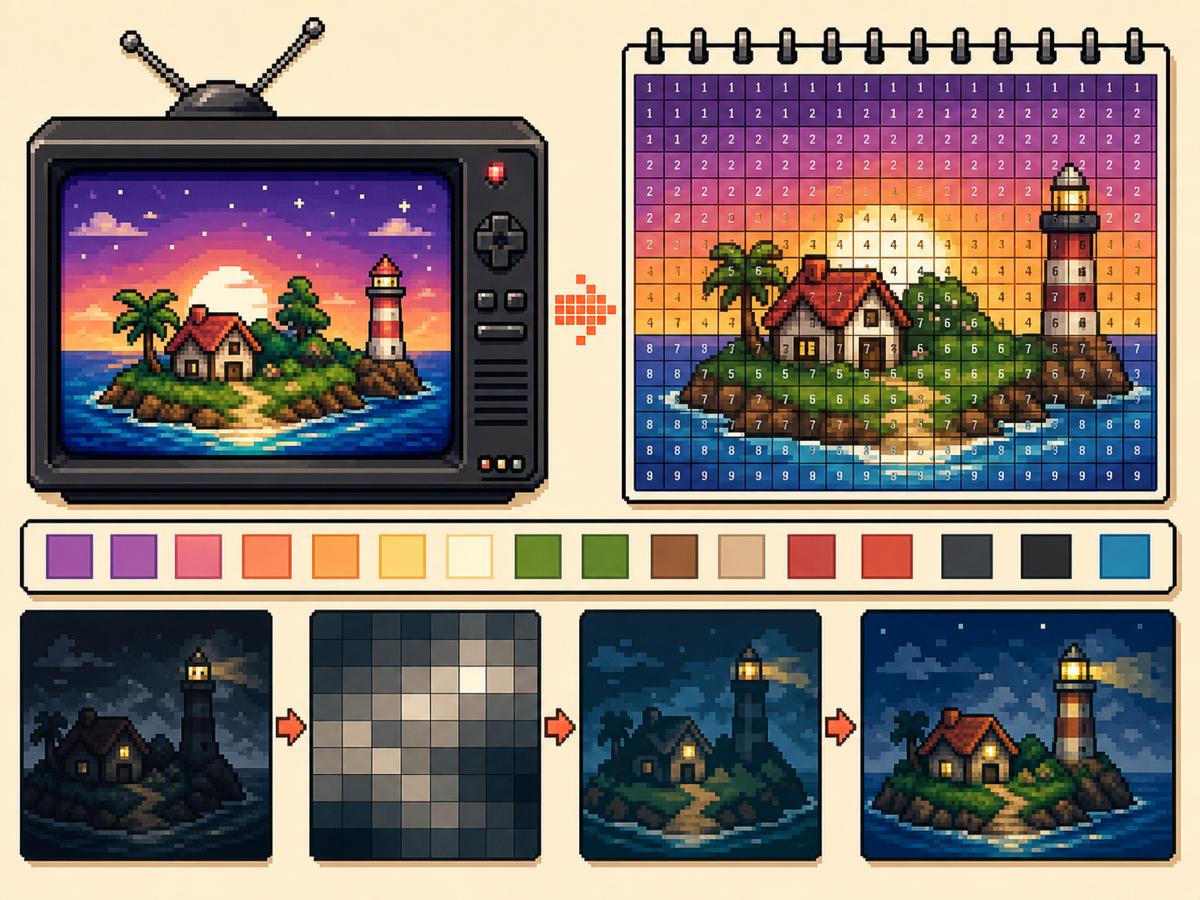
TV 画面アートは小さなアイコンより細部を入れられますが、強いコントラストと丁寧な整理が役立ちます。番号付きピクセルグリッドなら、シーン、ポートレート、タイトルカード、小さな飾り画像を写しやすくなります。
確認者 リビング・ザ・グリッド editor testing - 最終更新
このガイドでわかること
TV screen pixel art uses a larger トモダチライフ pixel grid to recreate scenes, title cards, portraits, and decorative images. The best results come from high-contrast source art, 32x32 or 48x48 sizing, simplified gradients, and a numbered guide you can copy over time.
Guide Images
手順
- コントラストの高い画像を選びます。 被写体と背景がはっきり分かれていると、TV 画面アートは読みやすくなります。
- 細かいシーンには 48x48 を使います。 大きなグリッドは顔、部屋、風景の形に余裕を与えますが、写す時間も長くなります。
- グラデーションを単純化します。 弱いディザリングは控えめに使います。グラデーションで交互のセルが多くなりすぎる場合は、色を減らして重要な輪郭を塗り直します。
- 番号付きパターンを書き出します。 番号付き書き出しは、長い作業でもデザインを正確に写す助けになります。
グリッド選択とトレードオフ
| 選択 | 向いている用途 | トレードオフ |
|---|---|---|
| 32x32 | Bold title cards, simple logos, and clear TV icons | Faster to copy, but complex scenes lose detail. |
| 48x48 | Portraits, rooms, landscapes, and detailed screen art | More room for detail, but more rows to track. |
| Reduced colors | Dark scenes, gradients, skies, and photos | Less exact color, but cleaner shapes and easier copying. |
TV ピクセルアートに向いた題材
ポートレート、タイトル画面、シンプルな風景、大きなアイコンはうまくいきやすいです。暗すぎるシーンや密度の高い写真は追加の整理が必要になりがちです。
小さな顔の特徴が重要な題材では 48x48 を使い、背景を単純化して顔が目立つようにします。
濁った TV アートを避ける方法
濁った結果は、多くの場合似た色が多すぎることから起こります。パレットを減らし、重要な輪郭を塗り直し、ハイライトを絞ります。
写す前に通常グリッドをプレビューします。番号なしでも読めるなら、番号付きパターンも実用的に再現できるはずです。
Picking the Right Frame
For TV-style art, the frame you choose matters as much as the grid size. Pick a moment with a clear subject, strong lighting, and a simple background rather than a motion-heavy frame full of blur.
Title cards, character close-ups, bright landscapes, and simple UI screens usually convert better than dark action scenes. If a frame already looks busy at thumbnail size, it will probably need heavy cleanup.
Handling Dark Scenes and Gradients
Dark scenes often collapse into a few nearly identical colors. Raise contrast before converting, then reduce the palette so shadows become readable blocks instead of scattered specks.
For skies, lighting, and soft backgrounds, keep dithering light. A small amount can smooth a gradient, but heavy dithering creates alternating cells that take longer to copy than they are worth.
Planning a Longer Copy Session
A detailed 48x48 TV image has 2,304 cells, so treat it like a longer project. Copy in rows or zones, mark completed areas outside the game, and stop at clean checkpoints.
If you notice a row shift late in the process, compare the plain preview against the numbered guide before repainting. Sometimes one corrected boundary fixes the image without redoing a whole section.
Example TV Screen Workflow
For a title screen, copy the background block and main title shape first, then add highlights or small decorative marks. If the title does not read at a distance, simplify the letters before copying the rest.
For a character scene, protect the face and outline first. Background details can be reduced heavily, because the viewer usually recognizes the scene from the character shape and strongest colors.
避けたいよくあるミス
- Using very dark screenshots. Dark images often collapse into similar colors. Raise contrast or choose a brighter frame first.
- Letting gradients dominate. Smooth gradients create many tiny changes. Reduce colors and preserve the important outlines.
- Copying without checkpoints. TV art takes longer. Mark completed rows or blocks outside the game so you can resume accurately.
関連ガイド
よくある質問
TV 画面アートは 48x48 を使うべき?
細かい画像には 48x48 を使います。太めのデザインや早く写したい場合は 32x32 を使ってください。
番号は最終画像を悪くしますか?
いいえ。番号付きパターンはガイドにすぎません。ラベルなしの最終画像を見るために通常 PNG プレビューも書き出せます。
What kind of TV image converts best?
Use a bright frame with one main subject and clear contrast. Dark, blurry, or crowded frames usually need extra editing before they make good pixel art.
How do I avoid losing my place on a 48x48 copy?
Divide the pattern into rows, quarters, or color passes and mark completed areas as you go. The numbered export is easiest to follow when you use visible checkpoints.