
按数字上色导出
朋友生活编号像素网格图案
编号图案会把转换后的图片变成按数字上色的工作表。当网格里有很多相近颜色,或需要分几次复制设计时,这是最有用的导出格式。
审查者 网格生活 editor testing - 最后更新
Upload an image, clean the cells, then export the numbered pattern from the download menu.
本指南涵盖内容
Numbered pixel grid patterns label each cell with a palette index so you can recreate a 朋友生活 design by matching one color number at a time. They are not direct game imports; they are structured visual references for manual 调色屋 copying.
Numbered Pattern Workflow
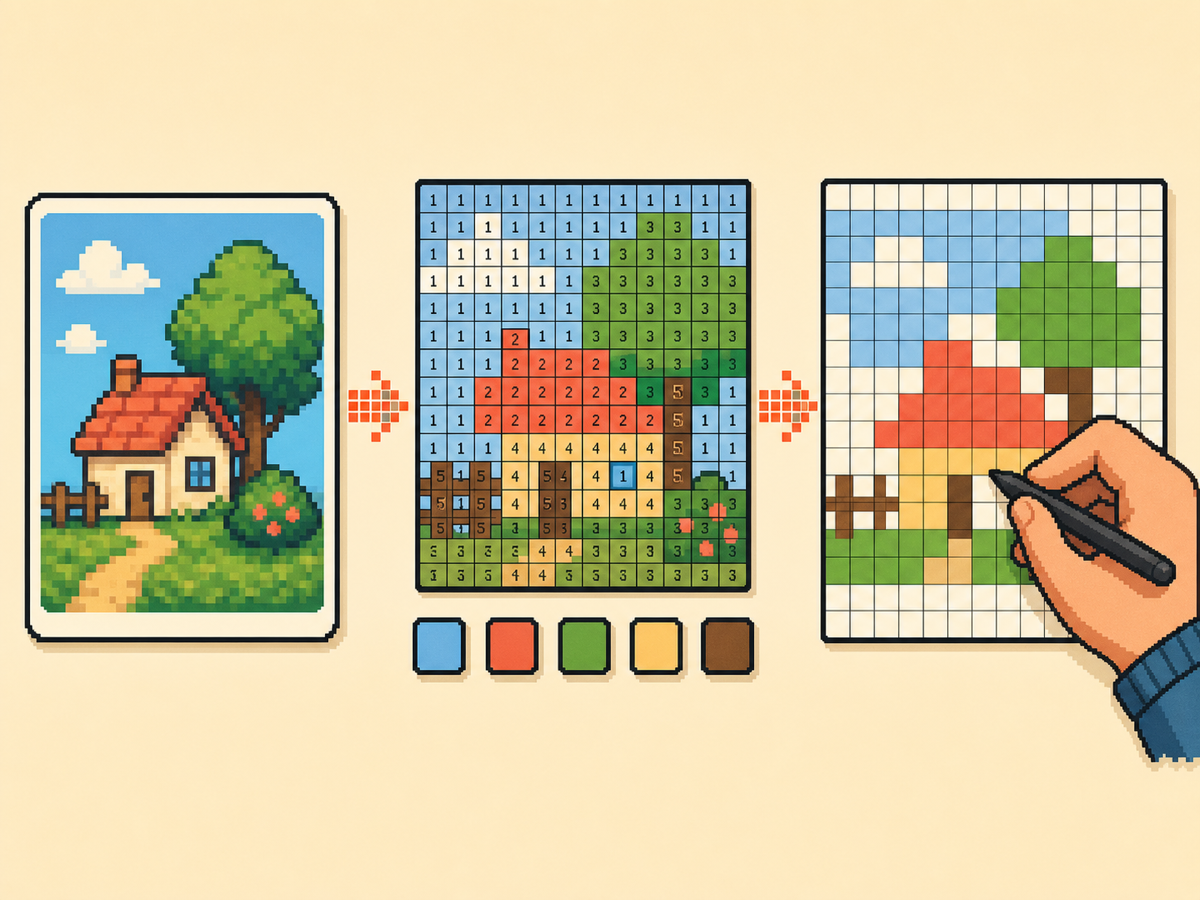
How to Use a Numbered Pattern
- Convert and simplify the source image. Crop the image, choose a grid size, reduce colors, and clean stray cells before exporting numbers.
- Export the paint-by-numbers worksheet. Use the numbered pattern export when similar colors are hard to distinguish in the plain grid preview.
- Copy by rows or focus blocks. Keep one row, quadrant, or focus block active at a time so you do not lose your position in 调色屋.
- Check the plain preview between passes. Numbers help you place colors, but the plain preview helps you catch shape errors before saving.
Export Choices
| 选择 | 适合用途 | 取舍 |
|---|---|---|
| Plain grid PNG | Quick visual checks and simple designs | Clean to look at, but similar colors can be hard to tell apart. |
| Numbered pattern | Long copy sessions, repeated colors, and exact palette matching | More information on the page, so crop and cleanup matter. |
| Recipe card | Sharing the grid setup, palette mode, canvas preset, and preview together | Best as a summary, not as the main cell-by-cell copying sheet. |
| JSON snapshot | Saving a project so you can reopen and edit it later | Useful for backup, but not as convenient to copy beside the game. |
Why Numbered Patterns Help
A converted grid can include several reds, grays, or skin tones that look almost identical on a small screen. Number labels remove the guesswork by assigning each used color a stable index.
This is especially useful for portraits, posters, TV screens, and logos where one wrong shade can break the outline or make lettering harder to read.
Best Time to Export Numbers
Export numbers after you finish cleanup. If you export too early, the worksheet will include stray cells, unnecessary colors, and tiny noise that you later decide not to copy.
A good workflow is source image, crop, grid size, palette mode, max colors, manual cleanup, plain preview check, then numbered export.
How to Track Your Place
For 32x32 grids, copy one row or one 8-cell block at a time. For 48x48 grids, work in larger visual landmarks such as face outline, hair shape, background, lettering, and highlights.
Keep the top-left corner anchored. If a row starts drifting, stop and compare the previous row against the plain preview before continuing.
Sharing Numbered References
A numbered pattern is easier for another player to reproduce than a screenshot alone. Share the grid size, palette mode, canvas preset, and any cleanup notes with the image.
Do not describe a numbered pattern as a direct import. It is a manual copying guide, and the final result still depends on brush setup and careful placement in-game.
需要避免的常见错误
- Exporting before cleanup. Noise creates extra numbers and makes the pattern harder to follow. Clean first, export second.
- Ignoring the plain preview. Numbers help with color placement, but the plain preview catches shape and silhouette problems.
- Copying the whole grid at once. Work by rows or focus blocks. Long sessions need checkpoints so one mistake does not spread across the design.
相关指南
常见问题
What is a numbered pixel grid pattern?
It is a grid export where each cell shows a palette number. You use those numbers as a paint-by-numbers reference while copying the design manually.
Is a numbered pattern an import file?
No. It is a visual reference for manual copying in 调色屋. It does not modify game files or upload anything into 朋友生活.
When should I use numbered export?
Use it for detailed grids, similar colors, portraits, posters, and any design you cannot finish in one short session.
Should I share the numbered version or the plain version?
Share both when possible. The numbered version helps copying, while the plain version shows what the finished design should look like.