
分享流程
如何分享朋友生活作品和调色屋设计
朋友生活的分享分为游戏内可本地交换的内容,以及玩家可在线记录的内容。本指南帮助你准备作品、导出清晰参考,并提供足够上下文,让其他玩家可以复刻,而不是承诺一键导入。
审查者 网格生活编辑审查 - 最后更新
网格准备好后,使用分享面板或导出按钮。
本指南涵盖内容
分享朋友生活作品通常有三种含义:游戏内本地无线交换、在社区发布截图或照片,或用 PNG 网格参考、编号图案和说明组成复刻指南。网格生活支持参考图和导出流程,不是 Mii 数据库,也不是官方上传服务。
Guide Images
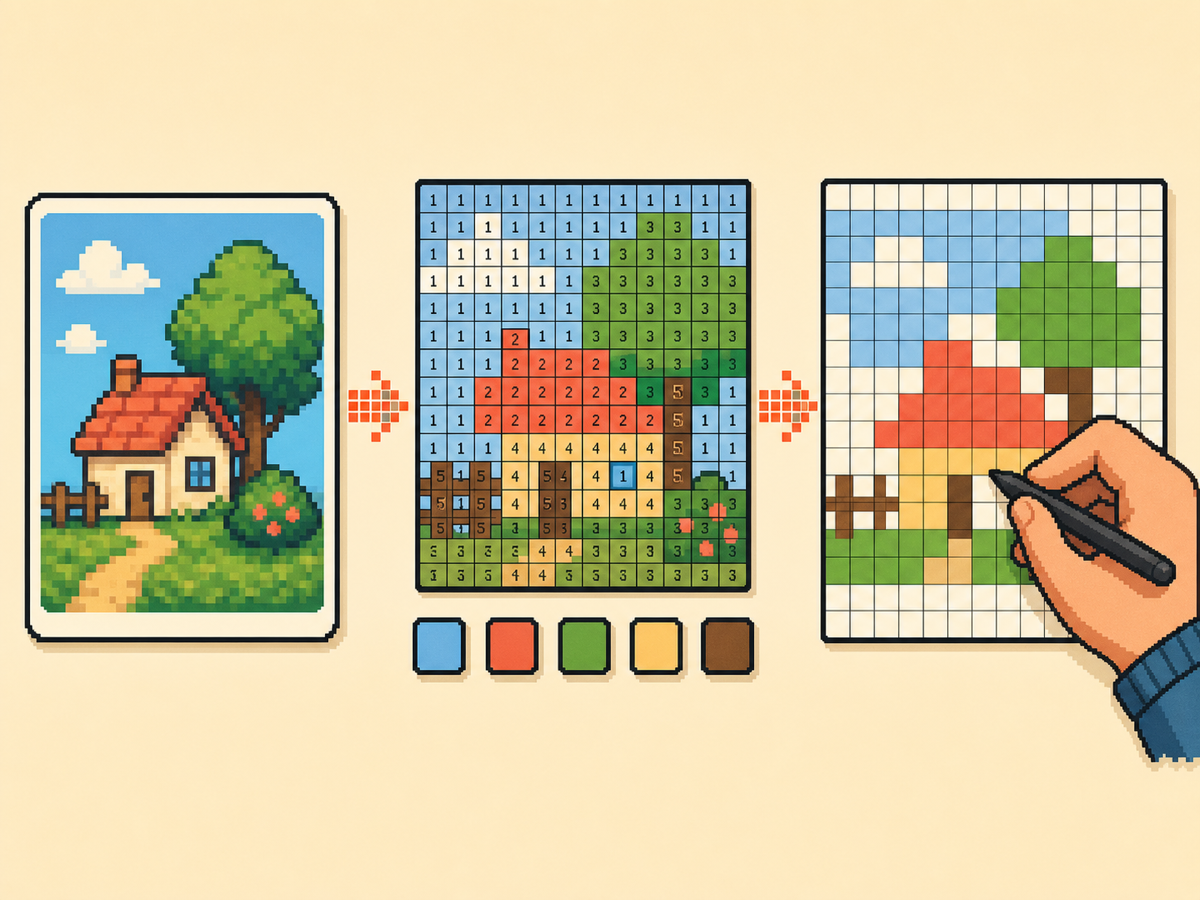
如何准备可分享作品
- Check whether local play fits. If the other player is nearby and both games are ready, use the official local wireless flow for creations you made on your island. It is the closest in-game sharing path, but it is not an internet upload feature.
- Export a clean visual reference. For online posts, export a PNG grid or plain preview first. This gives people a readable image of the design without needing your original source file.
- Add a numbered pattern. A numbered pattern makes 调色屋 designs easier to recreate because every cell points to a color number. Include it when the design has many similar shades or small details.
- Include setup notes. Mention the grid size, palette mode, color count, and any manual cleanup you made. Those notes help another player rebuild the design instead of guessing from a screenshot.
- Post to the right community. Use communities that allow fan creations, credit source art when needed, and avoid personal images or content you do not have permission to share.
分享方式与限制
| 选择 | 适合用途 | 取舍 |
|---|---|---|
| 本地无线 | Nearby players exchanging creations inside 朋友生活: 梦想生活 | Requires both players locally and does not create a public online listing. |
| PNG 网格参考 | Posting 调色屋 designs, custom clothes, posters, food, or object art online | Easy to share, but the receiver still recreates the art manually. |
| 编号图案和配方卡 | Detailed designs that need exact colors, row labels, or rebuild notes | More complete, but slower to prepare than a simple screenshot. |
朋友Share 覆盖的内容
朋友Share is a separate fan site focused on discovering, uploading, and sharing Mii residents. 网格生活 should not present itself as that service or use the 朋友Share name as a page target.
网格生活适合的位置
网格生活 is useful when the thing you want to share is a custom visual design. It turns source art into 调色屋 friendly references, numbered PNGs, recipe cards, and share links for your own project state.
在线发布应包含什么
A strong post includes the finished preview, numbered pattern, grid size, palette mode, title, source credit if needed, and a note that the design is meant for manual recreation.
安全与授权说明
Do not post private photos, personal information, or uncredited creator work as if it were your own. If a community has rules for custom designs or image uploads, follow those rules before attaching exports.
需要避免的常见错误
- 把它称为在线导入。 A PNG export is a reference for manual copying. It does not send art into the game or bypass local play.
- 只使用截图。 Screenshots are good for showing the result, but a numbered grid is much easier for another player to recreate accurately.
- 针对其他站点的品牌名。 Mention 朋友Share only when explaining the difference. This page should focus on 调色屋 and creation-sharing workflows.
相关指南
常见问题
这是朋友Share 吗?
不是。朋友Share 是独立粉丝项目,用于发现和分享 Mii 居民。网格生活专注于调色屋风格网格参考、PNG 导出、编号图案和配方卡。 在 GitHub 查看朋友Share
我可以从游戏中在线分享调色屋作品吗?
The official in-game exchange flow is local wireless. For online communities, share screenshots, exported grid references, numbered patterns, or recreation notes rather than claiming there is an official internet upload. 任天堂本地游玩支持
给其他玩家最好的导出是什么?
Use a plain preview for quick inspiration and a numbered pattern when accuracy matters. For detailed art, include the recipe card so the grid size and palette choices travel with the image.
网格生活可以托管我的作品吗?
No. This project does not include accounts, uploads, moderation, or a community database. It helps you prepare assets that you can post on communities you already use.
我应该分享原始源图片吗?
Only share source art when you own it or have permission. In most cases, the generated grid, finished preview, and credit note are enough for a fan creation post.