
调色板流程
像高手一样使用调色屋
把设计准备成编号像素网格后,调色屋操作会更轻松。网格会给出颜色顺序、逐行复制和清理计划,让你少花时间在相近颜色之间猜测。
审查者 网格生活 editor testing - 最后更新
本指南涵盖内容
调色屋 is the in-game drawing workflow where 朋友生活 pixel grids become usable art. A numbered grid turns the design into repeatable color instructions, helping you choose palette order, merge similar shades, and copy each row with fewer mistakes.
Guide Images
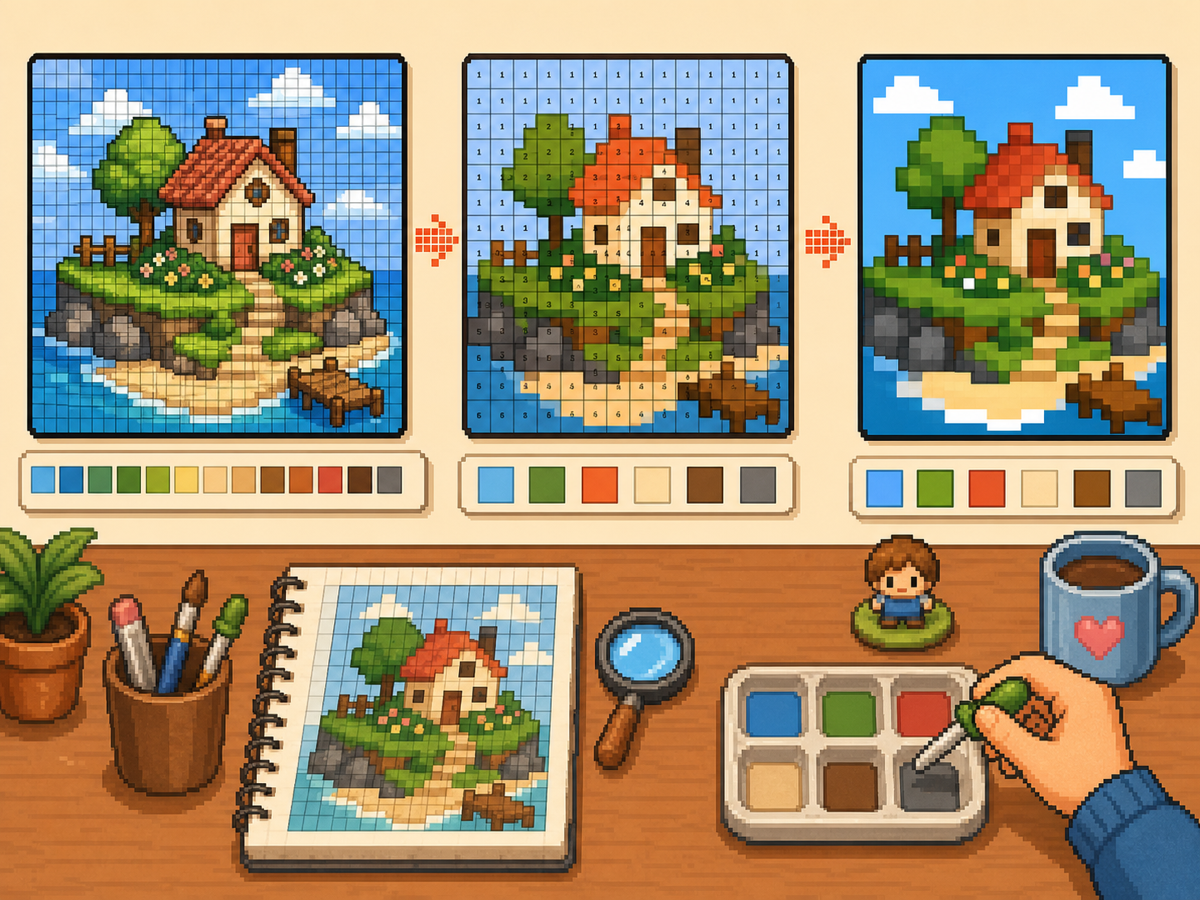
分步流程
- 导出编号图案。 编号图案会把每个网格格子变成调色板指令。这是手动重建设计时最容易跟随的格式。
- 归并相近颜色。 先复制大区域,再处理较小色阶。这样工作时整体设计仍然清晰。
- 经常检查轮廓。 每完成一轮主要颜色后缩小或退后查看图案。如果形状清晰,细节就更容易放置。
- 复杂图像使用减少颜色。 当图案有太多细小色差时,切换到更少颜色并重新生成。更简单的调色板通常在游戏内更干净。
网格选择与取舍
| 选择 | 适合用途 | 取舍 |
|---|---|---|
| Exact colors | Small art with a few strong source colors | Closer to the image, but similar shades may be hard to tell apart. |
| Reduced palette | Photos, gradients, skin tones, and busy source images | Less exact, but faster and cleaner for manual copying. |
| Manual cleanup | Outlines, logos, clothes, and high-contrast icons | Takes extra editing time, but produces the clearest in-game result. |
调色屋配色策略
先考虑可读性,再考虑精确匹配。把相近色合并成较小颜色集时,像素画通常更好看。
如果肤色、服装或背景变脏,请减少调色板颜色,并手动添加少量高光,不要保留源图中的每一种颜色。
调色屋常见错误
最常见的错误是从微小细节开始。先画轮廓和大面积填充,错误会更早显现。
另一个错误是给简单物体使用过大的网格。如果 48x48 结果显得嘈杂,干净的 32x32 可能更好看。
When to Merge Similar Colors
Merge colors when two swatches are hard to tell apart at normal viewing size. Exact source matching matters less than a design that reads clearly on the small in-game surface.
Skin tones, shadows, and soft gradients are the most common places to simplify. Pick one base color, one shadow, and one highlight before adding extra shades.
A Practical Copy Order
Copy the design in passes instead of treating every cell equally. First place the border and the largest blocks, then add the secondary colors, then finish with highlights, outlines, and single-cell corrections.
This pass-based method reduces rework. If a logo or face looks wrong after the first two passes, you can still fix the silhouette before the final details lock you into a messy shape.
When to Regenerate the Grid
Regenerate the pattern when cleanup would take longer than starting again. Warning signs include noisy backgrounds, dozens of one-cell color changes, unreadable eyes, or letters that break into specks.
Try one change at a time: crop tighter, lower the color count, switch from 48x48 to 32x32, or remove the background before uploading. Comparing two exports side by side is often faster than guessing.
Example 调色屋 Workflow
For a character face, begin with the hair outline and face shape, then fill skin and hair blocks before touching eyes or highlights. If the face still reads clearly after those first passes, the small details will have a stronger base.
For a logo, start with the outside silhouette and the most recognizable color. Add secondary colors only after the shape is correct. This keeps the design from drifting while you switch between palette swatches.
需要避免的常见错误
- Starting with tiny details. Copy the outline and large color blocks first so shape problems appear before the pattern gets crowded.
- Trusting every matched color. Palette matching is a starting point. Merge shades that look identical on the game screen.
- Overusing dithering. Heavy dithering creates alternating cells that are slow to copy. Save it for smooth gradients.
相关指南
常见问题
我应该使用生成调色板里的所有颜色吗?
不需要。只使用能提升可读性的颜色。合并相近色能让设计更容易复制,也让游戏内效果更干净。
抖色总是更好吗?
不是。轻微抖色能帮助渐变,但重度抖色会产生许多交替格子,手动复制很慢。
What should I copy first in 调色屋?
Copy the outline and largest color blocks first. Add small highlights, texture, and single-cell details after the silhouette already reads correctly.
When should I use a smaller grid?
Use a smaller grid when a simple object becomes noisy at 48x48. A clean 32x32 pattern often looks better than a detailed grid full of hard-to-copy color changes.