
导入流程
如何把图片导入朋友生活
朋友生活不支持从此工具直接上传图片。实际流程是把图片转换成清晰像素网格,导出编号图案,然后在调色屋或其他游戏内绘图界面中手动复制。
审查者 网格生活 editor testing - 最后更新
这两个工具都会在浏览器本地处理源图片。需要完整编辑控制时使用网格制作器,需要更快转换时使用像素艺术生成器。
本指南涵盖内容
Importing images into 朋友生活 means turning a source picture into a clean pixel grid reference, then manually rebuilding it in 调色屋. 网格生活 helps with image prep, color matching, numbered patterns, and practical copy steps without uploading art to a server.
Guide Images
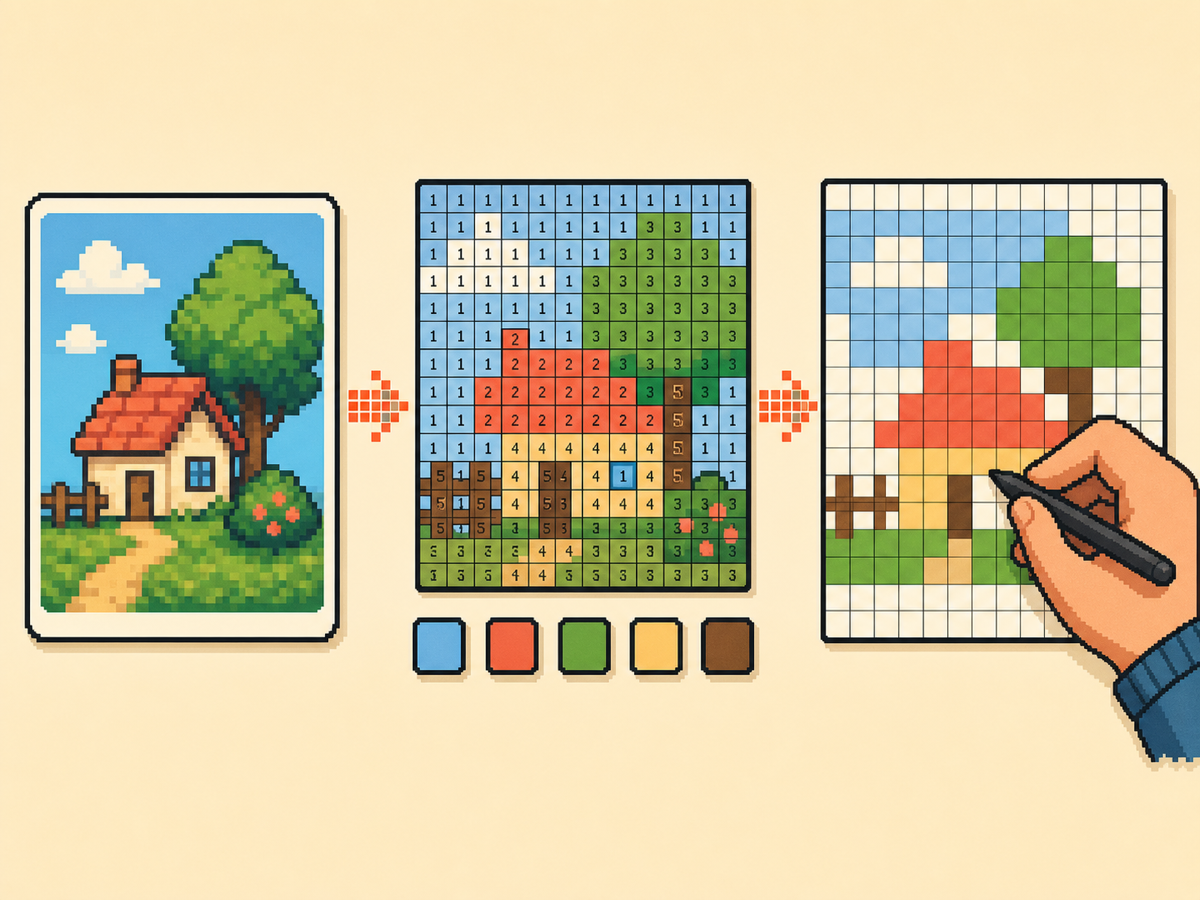
分步流程
- 选择简单的源图片。 从主体清晰、轮廓明显、背景噪点少的图片开始。裁剪过的角色图、图标、标志和简单物体,比细节照片更容易重建。
- 把图片转换成网格。 打开网格制作器,上传图片,多数作品选择 32x32。只有当设计需要更多细节且你有时间复制更多格子时,才使用 48x48。
- 清理图案。 导出前,用画笔、填充、橡皮擦、取色和缩放工具去除零散像素,并简化颜色区域。
- 导出编号指南。 下载编号图案,让每个格子都对应调色板色块。把干净 PNG 放在旁边,作为最终图像的视觉参考。
- 在游戏中复刻设计。 逐行复制图案。先画轮廓,再填大色块,最后添加小高光和点缀。
网格选择与取舍
| 选择 | 适合用途 | 取舍 |
|---|---|---|
| 16x16 | Icons, badges, and very simple logos | Fast to copy, but small details disappear quickly. |
| 32x32 | Most character art, symbols, and starter imports | Balanced detail without turning the import into a long session. |
| 48x48 | Faces, posters, and art with several important shapes | Clearer detail, but every extra row takes more time to repaint. |
照片、PNG 文件与源图片
最好的源图片在小尺寸下也能看清。如果缩小后主体消失,转换后通常会变得杂乱。
上传前,请围绕重要主体裁剪,并移除不必要的背景细节。更紧的裁剪能让网格把更多空间留给你关心的图像部分。
PNG、JPG、WebP 和 GIF 都可以作为源图片。背景干净的 PNG 通常最容易处理;细节丰富的照片往往需要更紧密的裁剪、更少的颜色和更多手动清理。
图片导入器与复制粘贴的区别
网格生活是图片转网格工具,并不是朋友生活的直接导入器。它会在浏览器中读取图片并生成可临摹参考,不会修改存档,也不会把作品发送进游戏。
朋友生活的调色屋没有普通的图片复制粘贴框。请导出编号图案和干净 PNG,再逐行手动复刻设计。
朋友生活图片导入流程
最稳妥的流程是:图片转网格,网格转编号图案,再把编号图案手动绘制成调色屋设计。即使游戏不接受网页工具直接上传,这样也能保持实际可操作。
像 "tomodachi life image import" 和 "importar imagenes tomodachi life" 这样的搜索通常表达同一件事:玩家想把图片变成能在游戏内复刻的内容。网格生活通过让参考图更容易复制来支持这个流程。
导入图片的最佳设置
想要均衡的第一版结果时使用 32x32。人脸、海报和包含小形状的设计使用 48x48。当编号图案太复杂难以跟随时,降低最大颜色数。
标志、图标、文字和服装边缘请关闭抖色。只有当源图包含渐变、肤色、天空或柔和阴影,并且没有混合像素会显得扁平时,才开启抖色。
为什么编号图案很重要
编号图案比普通图片更容易复制,因为每个格子都指向具体调色板颜色。当两个色调接近时,它能减少猜测。
对于大型设计,请一次复制一行或一个区块。编号能让你更容易暂停和继续,不会找不到位置。
Before You Upload: Source Image Checklist
The strongest imports have one subject, a clear outline, and a background you can remove without losing the point of the picture. Logos, icons, character faces, and high-contrast objects usually convert better than full screenshots.
If the subject is small inside the original image, crop first. A 32x32 grid only has 1,024 cells, so every cell spent on empty background is a cell you cannot use for eyes, hair, lettering, or clothing edges.
Copying the Pattern Without Losing Your Place
Treat the export like a map. Start with the outer silhouette, then fill the largest color regions, then place small highlights and edge corrections. This order makes mistakes visible before the design becomes crowded.
For a 48x48 pattern, divide the grid into four quarters or six horizontal bands and finish one area at a time. If you stop mid-session, write down the last row or block you completed so you do not repaint the same cells twice.
How to Fix a Bad Import Result
If the converted image looks muddy, do not try to rescue every pixel by hand. Go back to the source, raise contrast, crop tighter, reduce the color count, or choose a smaller grid that forces simpler shapes.
If the numbered guide feels hard to read, export both the numbered pattern and the clean preview. Use the clean preview to understand the final image, then use the numbered version only when you need exact cell placement.
需要避免的常见错误
- Trying to import directly. The export is a visual guide, not a game file. Plan time to copy the result manually in 调色屋.
- Keeping the whole image. Uncropped screenshots waste grid cells on background. Crop tightly around the subject before conversion.
- Using too many colors. Close shades slow down hand-copying. Reduce the palette when numbers become hard to follow.
相关指南
常见问题
可以把图片直接导入朋友生活吗?
不能。网格生活不会把图片注入游戏。它会把你的图片转换成编号像素网格参考,你需要在调色屋或其他游戏内绘图界面中手动复制。
最快的图片导入流程是什么?
紧密裁剪图片,从 32x32 开始,保持选择 Game-compatible 84,导出编号图案,然后先复制轮廓,再填充大色块。
网格生活能把图片直接发送到朋友生活吗?
不能。它会创建供你手动复刻的参考图案。导出内容是指南,不是可直接导入游戏的文件。
可以用照片或 PNG 制作朋友生活像素画吗?
可以。把照片或 PNG 上传到网格生活,完成裁剪、减色并导出编号参考图。转换后的设计仍需在调色屋中手动临摹。
可以把图片复制粘贴到朋友生活吗?
不可以。调色屋不接受从本网站普通粘贴图片。请把导出的网格作为逐格手动临摹参考。
我应该先用哪种网格尺寸?
从 32x32 开始。它能让多数设计保持清晰,同时不会让复制过程太慢。
我需要把图片上传到服务器吗?
不需要。转换会在浏览器中本地运行,下载内容会从当前会话生成。
Why does my imported image look blurry?
Most blurry results come from too many similar colors or a subject that is too detailed for the chosen grid. Crop tighter, increase contrast, or reduce the palette before exporting again.
Should I copy the numbered guide exactly?
Use it as the starting plan, then adjust by eye. Manual cleanup is normal, especially around faces, letters, outlines, and small highlights.