
电视画面艺术
电视画面像素画指南
电视画面作品可以承载比小图标更多的细节,但仍需要强对比和仔细清理。编号像素网格能让场景、肖像、标题卡和小装饰图更容易复制。
审查者 网格生活 editor testing - 最后更新
本指南涵盖内容
TV screen pixel art uses a larger 朋友生活 pixel grid to recreate scenes, title cards, portraits, and decorative images. The best results come from high-contrast source art, 32x32 or 48x48 sizing, simplified gradients, and a numbered guide you can copy over time.
Guide Images
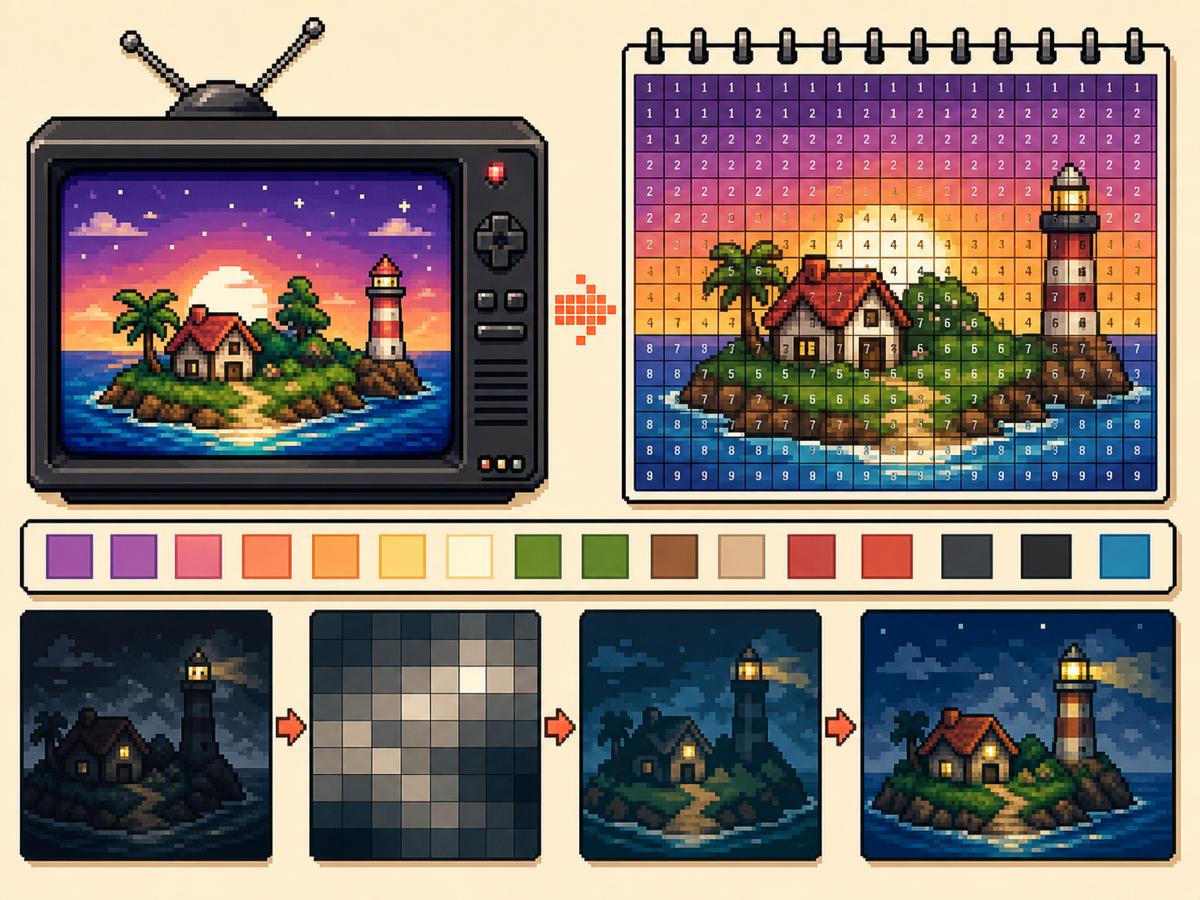
分步流程
- 选择高对比图片。 主体和背景分离清晰时,电视画面艺术更容易看清。
- 细节场景使用 48x48。 更大网格能给脸部、房间和风景形状更多空间,但复制也更耗时。
- 简化渐变。 少量使用轻微抖色。如果渐变产生太多交替格子,请减少颜色并重画重要边缘。
- 导出编号图案。 编号导出能帮助你在较长时间的操作中准确复制设计。
网格选择与取舍
| 选择 | 适合用途 | 取舍 |
|---|---|---|
| 32x32 | Bold title cards, simple logos, and clear TV icons | Faster to copy, but complex scenes lose detail. |
| 48x48 | Portraits, rooms, landscapes, and detailed screen art | More room for detail, but more rows to track. |
| Reduced colors | Dark scenes, gradients, skies, and photos | Less exact color, but cleaner shapes and easier copying. |
适合电视像素画的题材
肖像、标题画面、简单风景和大图标通常效果不错。很暗的场景和密集照片往往需要额外清理。
如果主体依赖小脸部特征,请使用 48x48 并简化背景,让脸部更突出。
如何避免电视画面变脏
脏乱结果通常来自过多相近颜色。请减少调色板颜色,重画重要轮廓,并限制高光数量。
复制前先预览普通网格。如果没有编号也能看清,编号图案通常也适合复刻。
Picking the Right Frame
For TV-style art, the frame you choose matters as much as the grid size. Pick a moment with a clear subject, strong lighting, and a simple background rather than a motion-heavy frame full of blur.
Title cards, character close-ups, bright landscapes, and simple UI screens usually convert better than dark action scenes. If a frame already looks busy at thumbnail size, it will probably need heavy cleanup.
Handling Dark Scenes and Gradients
Dark scenes often collapse into a few nearly identical colors. Raise contrast before converting, then reduce the palette so shadows become readable blocks instead of scattered specks.
For skies, lighting, and soft backgrounds, keep dithering light. A small amount can smooth a gradient, but heavy dithering creates alternating cells that take longer to copy than they are worth.
Planning a Longer Copy Session
A detailed 48x48 TV image has 2,304 cells, so treat it like a longer project. Copy in rows or zones, mark completed areas outside the game, and stop at clean checkpoints.
If you notice a row shift late in the process, compare the plain preview against the numbered guide before repainting. Sometimes one corrected boundary fixes the image without redoing a whole section.
Example TV Screen Workflow
For a title screen, copy the background block and main title shape first, then add highlights or small decorative marks. If the title does not read at a distance, simplify the letters before copying the rest.
For a character scene, protect the face and outline first. Background details can be reduced heavily, because the viewer usually recognizes the scene from the character shape and strongest colors.
需要避免的常见错误
- Using very dark screenshots. Dark images often collapse into similar colors. Raise contrast or choose a brighter frame first.
- Letting gradients dominate. Smooth gradients create many tiny changes. Reduce colors and preserve the important outlines.
- Copying without checkpoints. TV art takes longer. Mark completed rows or blocks outside the game so you can resume accurately.
相关指南
常见问题
电视画面艺术应该使用 48x48 吗?
细节图片使用 48x48。设计较醒目或想更快复制时使用 32x32。
编号会让最终图像变差吗?
不会。编号图案只是指南。你也可以导出无标签 PNG 预览,查看最终图像。
What kind of TV image converts best?
Use a bright frame with one main subject and clear contrast. Dark, blurry, or crowded frames usually need extra editing before they make good pixel art.
How do I avoid losing my place on a 48x48 copy?
Divide the pattern into rows, quarters, or color passes and mark completed areas as you go. The numbered export is easiest to follow when you use visible checkpoints.