
Decoración de la habitación
Crear carteles y decoraciones de pared
Los carteles y las decoraciones de las paredes pueden contener más detalles que la ropa, pero aun así necesitan una cuadrícula limpia. Los mejores resultados se obtienen al recortar con precisión, elegir un tamaño de cuadrícula que coincida con el tema y simplificar los colores antes de copiar.
Revisado por Living the Grid editor testing - Última actualización
Qué cubre esta guía
Poster and wall decoration pixel grids turn portraits, scenes, signs, and room art into structured Tomodachi Life copying guides. They can use more detail than clothing grids, but still need tight crops, readable contrast, simplified colors, and an export format that is practical to follow.
Guide Images
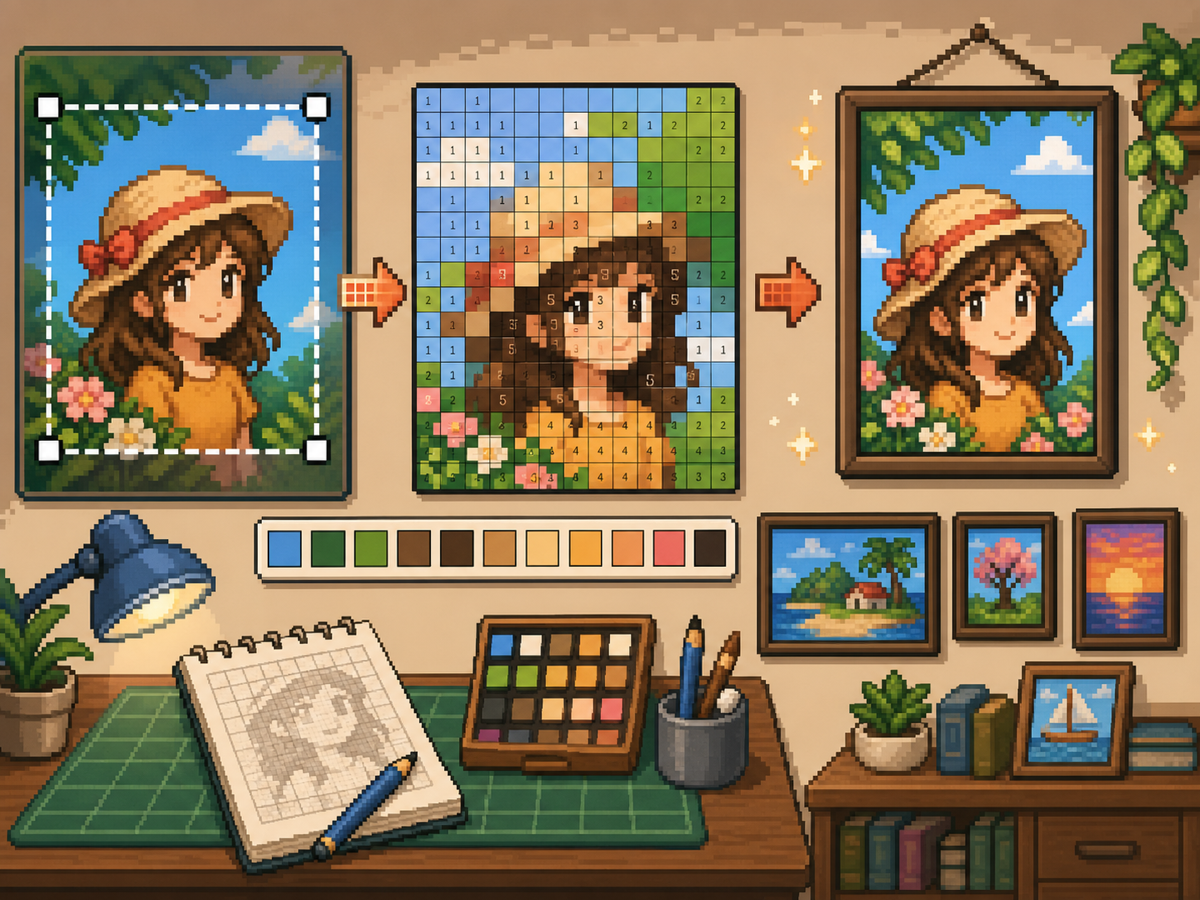
Flujo de trabajo paso a paso
- Recorta hasta obtener la forma final del póster. Elimine el fondo adicional antes de la conversión para que la cuadrícula se centre en la obra de arte, no en los márgenes vacíos.
- Pruebe 32x32 y 48x48. Utilice 32x32 para carteles en negrita y 48x48 para retratos, escenas o diseños con detalles similares a textos.
- Limpia el ruido del color. Los carteles suelen mostrar degradados y sombras. Reduzca las áreas ruidosas para que sea práctico copiar el patrón final.
- Exporta ambas versiones. Utilice el patrón numerado para copiar y la cuadrícula simple como verificación visual rápida.
Elecciones y compensaciones de la red
| Opción | Mejor para | Compensación |
|---|---|---|
| 24x24 | Simple signs, icons, and bold room decorations | Fast to copy, but not enough room for faces or text. |
| 32x32 | Most posters, portraits, and wall art with clear subjects | A strong balance between readable detail and effort. |
| 48x48 | Detailed scenes, portraits, and TV-like art panels | Best detail, but noisy source images require more cleanup. |
Preparación de la imagen del póster
Una buena fuente de carteles tiene un punto focal claro. Si la imagen original tiene un fondo ocupado, recórtela o simplifíquela antes de cargarla.
El texto es difícil de conservar en tamaños de cuadrícula pequeños. Si el texto es importante, utilice una cuadrícula más grande o reemplace el texto con una forma de bloque más simple.
Consejos de limpieza para la decoración de paredes
Utilice el selector para probar colores cercanos y volver a pintar celdas aisladas que no ayudan a la imagen. El ruido aislado es una de las formas más rápidas de hacer que un cartel parezca desordenado.
Al copiar el patrón, marque las filas o bloques terminados fuera del juego para no repetir ni saltarse celdas.
Choosing a Poster Source Image
A poster can handle more detail than a shirt, but it still needs one clear focal point. Portraits, album-style covers, title cards, and simple room art usually work better than busy screenshots.
If the original image has text, decide whether the text really needs to be readable. Large block letters can survive at 48x48, but small captions usually become noise and should be removed or redrawn.
Grid Size Decision for Wall Art
Use 32x32 when the poster is built around one bold shape. Use 48x48 when the subject depends on facial features, room details, or a recognizable scene.
Do not choose 48x48 only because it feels more detailed. The larger grid adds 1,280 more cells than 32x32, so it is worth using only when the extra cells make the final image easier to recognize.
Copy Workflow for Larger Posters
For a poster-sized copy session, work in bands. Finish the top quarter, check the silhouette, then move to the next section. This keeps your place and prevents small row offsets from spreading through the whole design.
Keep the plain preview nearby while copying the numbered pattern. The preview helps you notice when a copied row is shifted, while the numbers help with exact color placement.
Example Poster Workflow
For a portrait poster, place the head shape, hair mass, and background color before adding eyes, mouth, or small shadows. If the face looks wrong at that stage, adjust the crop or grid size before investing time in details.
For a sign or title card, block out the largest letters first and simplify any lettering that breaks apart. A readable three-letter mark is better than a longer phrase that turns into scattered pixels.
Errores comunes a evitar
- Keeping tiny text. Small lettering usually breaks during conversion. Replace it with block shapes or use a larger grid.
- Leaving busy backgrounds. Background noise steals cells from the subject. Crop and simplify before using the creador de cuadrículas.
- Skipping the plain preview. Check the clean PNG before copying. If it is not readable without numbers, simplify the pattern.
Guías relacionadas
Preguntas frecuentes
¿Es 48x48 lo mejor para cada póster?
No. Utilice 48x48 para carteles detallados, pero los diseños más simples suelen verse más limpios y requieren menos tiempo en 32x32.
¿Puede el texto pequeño sobrevivir a la conversión?
Generalmente no. Las letras mayúsculas grandes pueden funcionar, pero el texto pequeño debe simplificarse o eliminarse.
Should I remove the poster background?
Remove or simplify the background when it competes with the subject. A cleaner background gives the main shape more grid cells and makes the copy easier.
Why does my poster look noisy?
Poster noise usually comes from gradients, shadows, or busy backgrounds. Reduce the palette, repaint isolated cells, and check the plain preview before copying.