
Arte de la pantalla de televisión
Guía de arte de píxeles de pantalla de TV
Las ilustraciones de la pantalla del televisor pueden manejar más detalles que los íconos pequeños, pero aun así se benefician de un fuerte contraste y una limpieza cuidadosa. Una cuadrícula de píxeles numerados facilita la copia de escenas, retratos, tarjetas de título y pequeñas imágenes decorativas.
Revisado por Living the Grid editor testing - Última actualización
Qué cubre esta guía
TV screen pixel art uses a larger Tomodachi Life pixel grid to recreate scenes, title cards, portraits, and decorative images. The best results come from high-contrast source art, 32x32 or 48x48 sizing, simplified gradients, and a numbered guide you can copy over time.
Guide Images
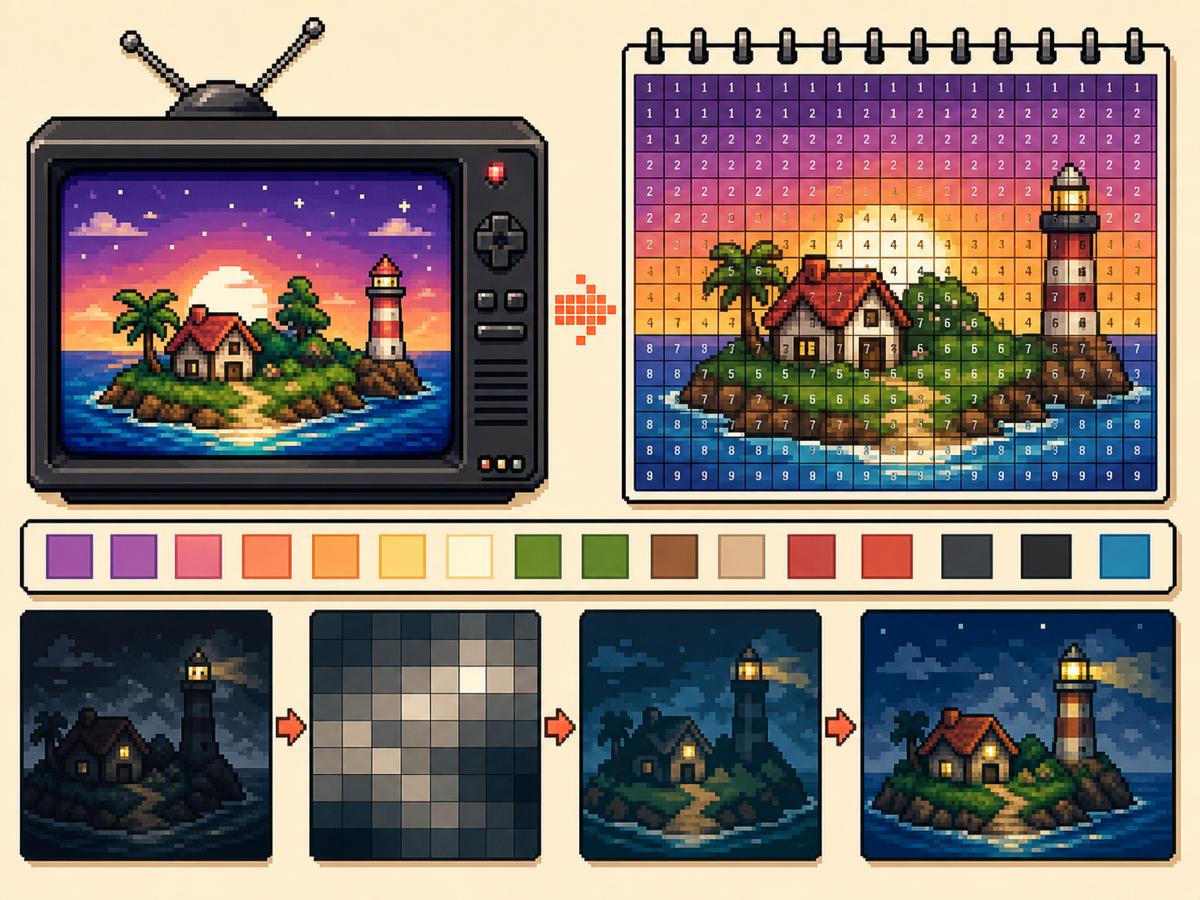
Flujo de trabajo paso a paso
- Elija una imagen de alto contraste. El arte de la pantalla del televisor es más fácil de leer cuando el sujeto está claramente separado del fondo.
- Utilice 48x48 para escenas detalladas. Una cuadrícula más grande da más espacio a las caras, las habitaciones y las formas del paisaje, pero también lleva más tiempo copiarlas.
- Simplifica los degradados. Utilice un tramado suave con moderación. Si un degradado crea demasiadas celdas alternas, reduzca los colores y vuelva a pintar los bordes importantes.
- Exporta un patrón numerado. La exportación numerada le ayuda a copiar el diseño con precisión durante una sesión más larga.
Elecciones y compensaciones de la red
| Opción | Mejor para | Compensación |
|---|---|---|
| 32x32 | Bold title cards, simple logos, and clear TV icons | Faster to copy, but complex scenes lose detail. |
| 48x48 | Portraits, rooms, landscapes, and detailed screen art | More room for detail, but more rows to track. |
| Reduced colors | Dark scenes, gradients, skies, and photos | Less exact color, but cleaner shapes and easier copying. |
Los mejores temas para TV Pixel Art
Los retratos, las pantallas de título, los paisajes simples y los íconos grandes suelen funcionar bien. Las escenas muy oscuras y las fotografías densas suelen necesitar una limpieza adicional.
Si el sujeto depende de rasgos faciales pequeños, use 48x48 y simplifique el fondo para que el rostro reciba más atención.
Cómo evitar el arte televisivo embarrado
Los resultados turbios generalmente provienen de demasiados colores similares. Reduzca la paleta, vuelva a pintar contornos importantes y mantenga las luces limitadas.
Obtenga una vista previa de la cuadrícula simple antes de copiar. Si la vista previa se puede leer sin números, debería ser práctico recrear el patrón numerado.
Picking the Right Frame
For TV-style art, the frame you choose matters as much as the grid size. Pick a moment with a clear subject, strong lighting, and a simple background rather than a motion-heavy frame full of blur.
Title cards, character close-ups, bright landscapes, and simple UI screens usually convert better than dark action scenes. If a frame already looks busy at thumbnail size, it will probably need heavy cleanup.
Handling Dark Scenes and Gradients
Dark scenes often collapse into a few nearly identical colors. Raise contrast before converting, then reduce the palette so shadows become readable blocks instead of scattered specks.
For skies, lighting, and soft backgrounds, keep dithering light. A small amount can smooth a gradient, but heavy dithering creates alternating cells that take longer to copy than they are worth.
Planning a Longer Copy Session
A detailed 48x48 TV image has 2,304 cells, so treat it like a longer project. Copy in rows or zones, mark completed areas outside the game, and stop at clean checkpoints.
If you notice a row shift late in the process, compare the plain preview against the numbered guide before repainting. Sometimes one corrected boundary fixes the image without redoing a whole section.
Example TV Screen Workflow
For a title screen, copy the background block and main title shape first, then add highlights or small decorative marks. If the title does not read at a distance, simplify the letters before copying the rest.
For a character scene, protect the face and outline first. Background details can be reduced heavily, because the viewer usually recognizes the scene from the character shape and strongest colors.
Errores comunes a evitar
- Using very dark screenshots. Dark images often collapse into similar colors. Raise contrast or choose a brighter frame first.
- Letting gradients dominate. Smooth gradients create many tiny changes. Reduce colors and preserve the important outlines.
- Copying without checkpoints. TV art takes longer. Mark completed rows or blocks outside the game so you can resume accurately.
Guías relacionadas
Preguntas frecuentes
¿El arte de la pantalla del televisor debería usar 48x48?
Utilice 48x48 para imágenes detalladas. Utilice 32x32 cuando el diseño esté en negrita o cuando desee un proceso de copia más rápido.
¿Los números empeoran la imagen final?
No. El patrón numerado es sólo una guía. También puede exportar una vista previa simple de PNG para ver la imagen final sin etiquetas.
What kind of TV image converts best?
Use a bright frame with one main subject and clear contrast. Dark, blurry, or crowded frames usually need extra editing before they make good pixel art.
How do I avoid losing my place on a 48x48 copy?
Divide the pattern into rows, quarters, or color passes and mark completed areas as you go. The numbered export is easiest to follow when you use visible checkpoints.