
Рабочий процесс палитры
Использование Palette House как профессионал
Palette House Работа становится проще, если дизайн подготовлен в виде пронумерованной пиксельной сетки. Сетка дает вам план порядка цветов, построчного копирования и очистки, поэтому вы тратите меньше времени на угадывание похожих оттенков.
Проверено Living the Grid editor testing - Последнее обновление
Что охватывает это руководство
Palette House is the in-game drawing workflow where Tomodachi Life pixel grids become usable art. A numbered grid turns the design into repeatable color instructions, helping you choose palette order, merge similar shades, and copy each row with fewer mistakes.
Guide Images
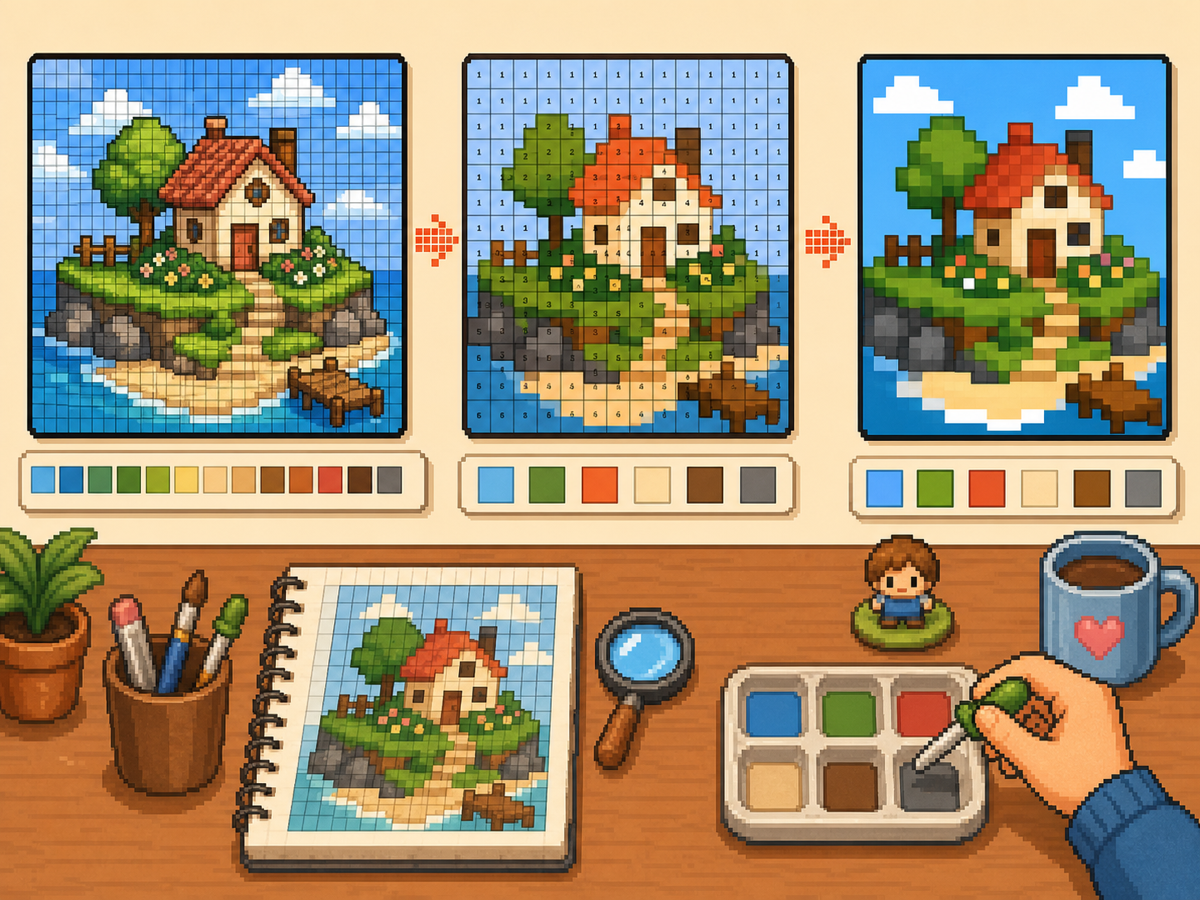
Пошаговый рабочий процесс
- Экспортируйте пронумерованный шаблон. Пронумерованный шаблон превращает каждую ячейку сетки в инструкцию палитры. Это самый простой формат, которому можно следовать при восстановлении дизайна вручную.
- Сгруппируйте похожие цвета. Сначала скопируйте большие области, затем переходите к более мелким оттенкам. Благодаря этому общий дизайн будет читабельным во время работы.
- Чаще проверяйте силуэт. Уменьшите масштаб или отступите от рисунка после каждого прохода основного цвета. Если форма читается четко, детали будет легче разместить.
- Используйте уменьшенные цвета для насыщенного искусства. Если в узоре слишком много мелких изменений оттенков, переключитесь на меньшее количество цветов и выполните регенерацию. Более простая палитра обычно выглядит в игре чище.
Выбор сетки и компромиссы
| Вариант | Лучшее для | Компромисс |
|---|---|---|
| Exact colors | Small art with a few strong source colors | Closer to the image, but similar shades may be hard to tell apart. |
| Reduced palette | Photos, gradients, skin tones, and busy source images | Less exact, but faster and cleaner for manual copying. |
| Manual cleanup | Outlines, logos, clothes, and high-contrast icons | Takes extra editing time, but produces the clearest in-game result. |
Palette House Цветовая стратегия
Выбирайте цвета, основываясь в первую очередь на читабельности, а затем на точном совпадении. Пиксельная графика часто выглядит лучше, когда соседние оттенки объединены в меньший набор.
Если кожа, одежда или фон становятся мутными, уменьшите палитру и добавьте несколько бликов вручную вместо того, чтобы сохранять каждый исходный цвет.
Распространенные ошибки Palette House
Самая распространенная ошибка — начинать с мелких деталей. Сначала нарисуйте контур и крупные заливки, чтобы ошибки были видны как можно раньше.
Другая ошибка — использование слишком большой сетки для простого объекта. Если результат 48x48 кажется шумным, более чистая сетка 32x32 может выглядеть лучше.
When to Merge Similar Colors
Merge colors when two swatches are hard to tell apart at normal viewing size. Exact source matching matters less than a design that reads clearly on the small in-game surface.
Skin tones, shadows, and soft gradients are the most common places to simplify. Pick one base color, one shadow, and one highlight before adding extra shades.
A Practical Copy Order
Copy the design in passes instead of treating every cell equally. First place the border and the largest blocks, then add the secondary colors, then finish with highlights, outlines, and single-cell corrections.
This pass-based method reduces rework. If a logo or face looks wrong after the first two passes, you can still fix the silhouette before the final details lock you into a messy shape.
When to Regenerate the Grid
Regenerate the pattern when cleanup would take longer than starting again. Warning signs include noisy backgrounds, dozens of one-cell color changes, unreadable eyes, or letters that break into specks.
Try one change at a time: crop tighter, lower the color count, switch from 48x48 to 32x32, or remove the background before uploading. Comparing two exports side by side is often faster than guessing.
Example Palette House Workflow
For a character face, begin with the hair outline and face shape, then fill skin and hair blocks before touching eyes or highlights. If the face still reads clearly after those first passes, the small details will have a stronger base.
For a logo, start with the outside silhouette and the most recognizable color. Add secondary colors only after the shape is correct. This keeps the design from drifting while you switch between palette swatches.
Распространенные ошибки, которых следует избегать
- Starting with tiny details. Copy the outline and large color blocks first so shape problems appear before the pattern gets crowded.
- Trusting every matched color. Palette matching is a starting point. Merge shades that look identical on the game screen.
- Overusing dithering. Heavy dithering creates alternating cells that are slow to copy. Save it for smooth gradients.
Связанные руководства
Часто задаваемые вопросы
Должен ли я использовать все цвета из сгенерированной палитры?
Нет. Используйте только те цвета, которые улучшают читаемость. Объединение близких оттенков может облегчить копирование дизайна и сделать его чище в игре.
Всегда ли сглаживание лучше?
Нет. Мягкое сглаживание может помочь в создании градиентов, но сильное сглаживание создает множество чередующихся ячеек, которые медленно копируются вручную.
What should I copy first in Palette House?
Copy the outline and largest color blocks first. Add small highlights, texture, and single-cell details after the silhouette already reads correctly.
When should I use a smaller grid?
Use a smaller grid when a simple object becomes noisy at 48x48. A clean 32x32 pattern often looks better than a detailed grid full of hard-to-copy color changes.