
Искусство ТВ-экрана
Руководство по пиксельной графике экрана телевизора
Изображение на экране телевизора может обрабатывать больше деталей, чем крошечные значки, но оно по-прежнему выигрывает от сильного контраста и тщательной очистки. Пронумерованная пиксельная сетка упрощает копирование сцен, портретов, титульных карточек и небольших декоративных изображений.
Проверено Living the Grid editor testing - Последнее обновление
Что охватывает это руководство
TV screen pixel art uses a larger Tomodachi Life pixel grid to recreate scenes, title cards, portraits, and decorative images. The best results come from high-contrast source art, 32x32 or 48x48 sizing, simplified gradients, and a numbered guide you can copy over time.
Guide Images
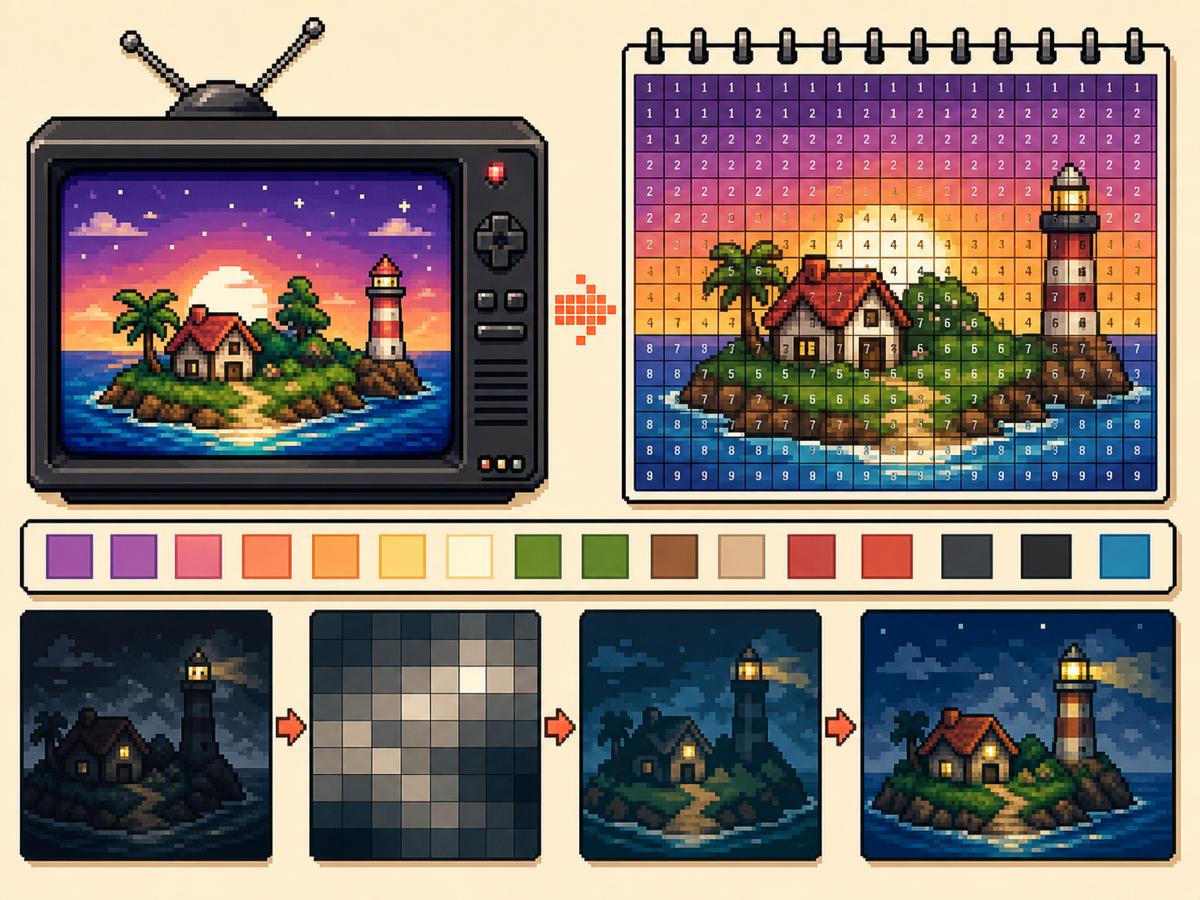
Пошаговый рабочий процесс
- Выберите высококонтрастное изображение. Изображение на телеэкране легче читать, если объект четко отделен от фона.
- Используйте 48x48 для детальных сцен. Более крупная сетка дает больше места лицам, комнатам и ландшафтным формам, но копирование занимает больше времени.
- Упростите градиенты. Используйте мягкое сглаживание экономно. Если градиент создает слишком много чередующихся ячеек, уменьшите цвета и перекрасьте важные края.
- Экспортируйте пронумерованный шаблон. Нумерованный экспорт поможет вам точно скопировать дизайн в течение более длительного сеанса.
Выбор сетки и компромиссы
| Вариант | Лучшее для | Компромисс |
|---|---|---|
| 32x32 | Bold title cards, simple logos, and clear TV icons | Faster to copy, but complex scenes lose detail. |
| 48x48 | Portraits, rooms, landscapes, and detailed screen art | More room for detail, but more rows to track. |
| Reduced colors | Dark scenes, gradients, skies, and photos | Less exact color, but cleaner shapes and easier copying. |
Лучшие сюжеты для телевизионного пиксель-арта
Портреты, титульные экраны, простые пейзажи и большие значки обычно работают хорошо. Очень темные сцены и плотные фотографии часто требуют дополнительной очистки.
Если объект съемки зависит от мелких черт лица, используйте размер 48x48 и упростите фон, чтобы лицо привлекало больше внимания.
Как избежать грязного телевизионного искусства
Мутные результаты обычно возникают из-за слишком большого количества похожих цветов. Уменьшите палитру, перекрасьте важные контуры и ограничьте количество светлых участков.
Предварительный просмотр простой сетки перед копированием. Если предварительный просмотр читается без цифр, то пронумерованный образец будет удобно воссоздать.
Picking the Right Frame
For TV-style art, the frame you choose matters as much as the grid size. Pick a moment with a clear subject, strong lighting, and a simple background rather than a motion-heavy frame full of blur.
Title cards, character close-ups, bright landscapes, and simple UI screens usually convert better than dark action scenes. If a frame already looks busy at thumbnail size, it will probably need heavy cleanup.
Handling Dark Scenes and Gradients
Dark scenes often collapse into a few nearly identical colors. Raise contrast before converting, then reduce the palette so shadows become readable blocks instead of scattered specks.
For skies, lighting, and soft backgrounds, keep dithering light. A small amount can smooth a gradient, but heavy dithering creates alternating cells that take longer to copy than they are worth.
Planning a Longer Copy Session
A detailed 48x48 TV image has 2,304 cells, so treat it like a longer project. Copy in rows or zones, mark completed areas outside the game, and stop at clean checkpoints.
If you notice a row shift late in the process, compare the plain preview against the numbered guide before repainting. Sometimes one corrected boundary fixes the image without redoing a whole section.
Example TV Screen Workflow
For a title screen, copy the background block and main title shape first, then add highlights or small decorative marks. If the title does not read at a distance, simplify the letters before copying the rest.
For a character scene, protect the face and outline first. Background details can be reduced heavily, because the viewer usually recognizes the scene from the character shape and strongest colors.
Распространенные ошибки, которых следует избегать
- Using very dark screenshots. Dark images often collapse into similar colors. Raise contrast or choose a brighter frame first.
- Letting gradients dominate. Smooth gradients create many tiny changes. Reduce colors and preserve the important outlines.
- Copying without checkpoints. TV art takes longer. Mark completed rows or blocks outside the game so you can resume accurately.
Связанные руководства
Часто задаваемые вопросы
Должны ли телевизионные изображения использовать размер 48x48?
Используйте размер 48x48 для детальных изображений. Используйте размер 32x32, если дизайн выделен жирным шрифтом или если вам нужен более быстрый процесс копирования.
Делают ли цифры итоговое изображение хуже?
Нет. Пронумерованный образец является лишь справочным. Вы также можете экспортировать простой предварительный просмотр PNG, чтобы увидеть окончательное изображение без меток.
What kind of TV image converts best?
Use a bright frame with one main subject and clear contrast. Dark, blurry, or crowded frames usually need extra editing before they make good pixel art.
How do I avoid losing my place on a 48x48 copy?
Divide the pattern into rows, quarters, or color passes and mark completed areas as you go. The numbered export is easiest to follow when you use visible checkpoints.