
外部工具参考
朋友生活 TomoTexture 下载:安全、版本与替代方案
TomoTexture 是 Alfonso Mallozzi 制作的非官方 Windows 工具,用于替换朋友生活存档文件中的 UGC 画布图。本页说明它能做什么、支持什么、如何验证当前下载,以及什么时候手动像素网格是更安全的选择。
审查者 网格生活编辑审查 - 最后更新
官方 GitHub 发布文件。最后检查时间:2026 年 6 月 2 日。
本指南涵盖内容
TomoTexture 与网格生活相互独立。它编辑本地朋友生活存档内容,而网格生活创建基于浏览器的像素网格参考和 PNG 导出。请把本页当作安全优先的下载参考,而不是官方镜像,然后再判断存档编辑是否适合你的设置。
- 版本
- v1.0-beta.2
- 发布日期
- 2026-04-18
- 平台
- Windows
- 文件大小
- 34,239,902 bytes
- 直接 URL
https://github.com/AlfonsoMallozzi/TomoTexture/releases/download/release/TomoTexture1.1.exe- SHA-256
6743cb5fe3638d4c3b5285e4a0a10c2fbf57a55b2a55a83071fc5c08a0010fa1
TomoTexture 是外部闭源可执行文件。请扫描文件、保留备份,并且只在你能接受编辑本地游戏存档时使用。
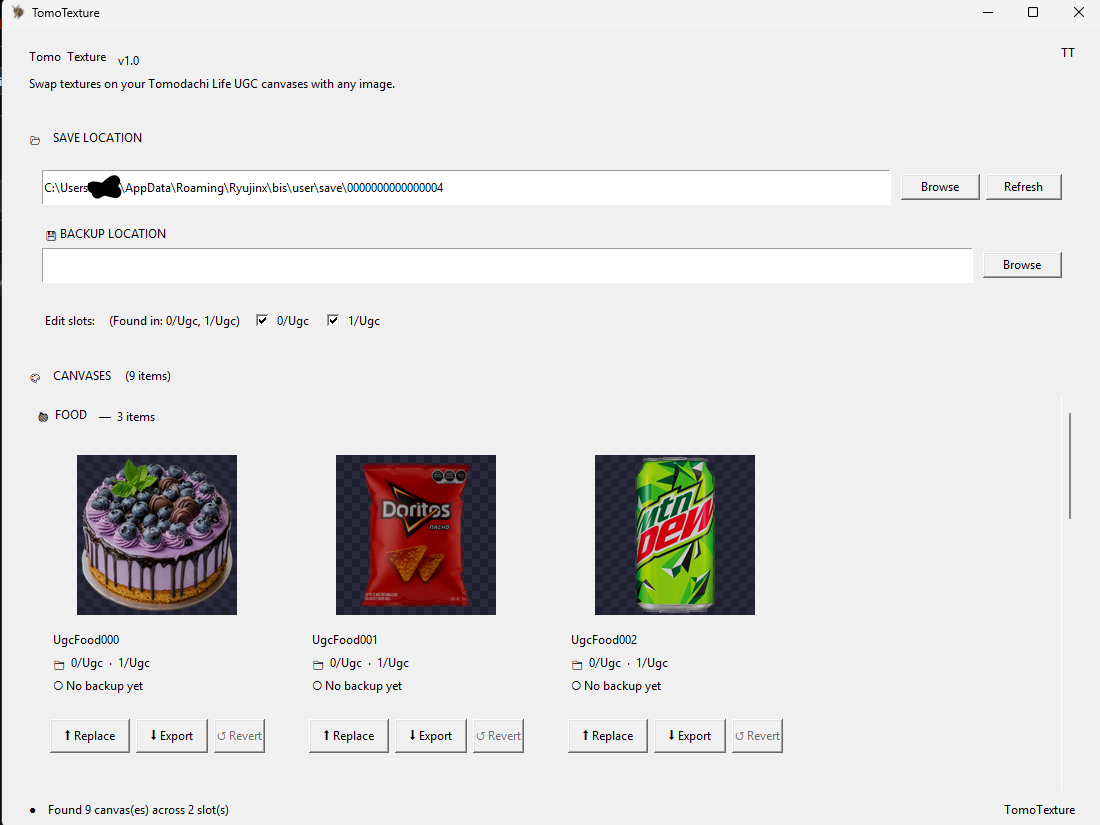
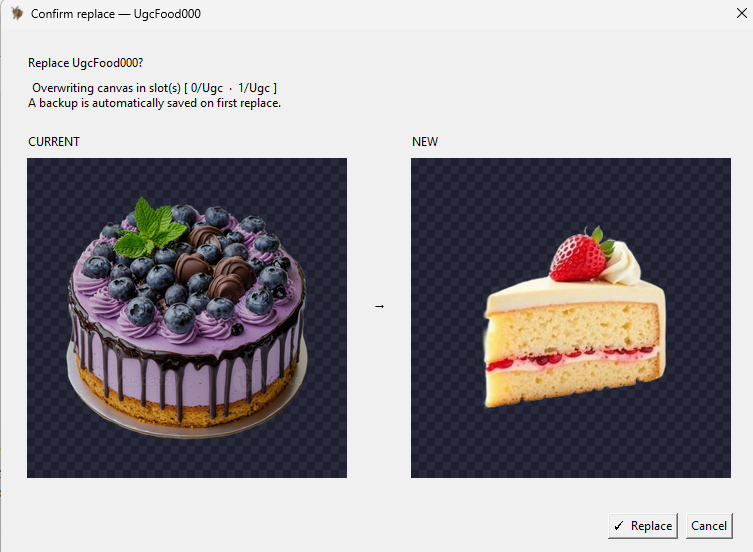
GitHub 截图
如何下载 TomoTexture
- 打开官方 GitHub 发布页。 如果想查看说明、截图、问题报告,或确认是否有更新版本替代此 TomoTexture 下载,请先打开最新发布页面。
- 下载 Windows 可执行文件。 当前直接文件是 TomoTexture1.1.exe。它是 Windows 可执行文件,不是浏览器工具,也不是 Next.js 依赖。
- 打开前验证文件。 确认本页列出的文件名、发布者上下文和 SHA-256 校验和。如果校验和不匹配,请不要运行该文件。
- 备份你的存档文件夹。 TomoTexture 会修改本地存档文件内容。在选择槽位或替换任何图案前,请保留单独备份。
- 编辑时关闭模拟器。 发布说明提醒,模拟器打开时编辑可能会导致问题。请先关闭游戏,完成编辑后再重新打开并正常保存。
下载选项与取舍
| 选择 | 适合用途 | 取舍 |
|---|---|---|
| 直接下载 | 已经信任该版本、只想快速取得可执行文件的老用户 | 路径最快,但会跳过发布说明和较新的问题报告。 |
| GitHub 发布页 | 首次使用、需要检查最新版本、已知问题和文件细节的用户 | 多一次点击,但下载前能获得更多上下文。 |
| 网格生活 | 只需要图片准备、像素网格、编号指南和 PNG 导出的用户 | 它不会编辑存档,也不会把图案直接导入朋友生活。 |
| 手动像素网格流程 | 想在不运行可执行文件的情况下临摹调色屋图案的玩家 | 更安全且基于浏览器,但你仍需要手动重绘设计。 |
TomoTexture 支持什么
当前 README 将食物、物品和脸部列为受支持的朋友生活 UGC 画布目标。发布说明指出,物品支持不包含视频。
这让 TomoTexture 适合想直接处理存档纹理、而不是在调色屋手动重画每个设计的玩家。
它与网格生活的配合方式
在使用外部存档工具前,网格生活仍然有用,因为它可以裁剪、简化、减色,并把源图片预览成像素画。尝试任何直接存档流程前,如果需要干净参考图,请先使用网格制作器。
如果你只想要安全的浏览器流程,请继续使用网格制作器并导出编号 PNG 参考。如果你想直接替换存档文件,TomoTexture 是需要单独评估的 Windows 工具。
安全与来源说明
该 GitHub 仓库没有公开应用源代码。请把可执行文件视为第三方软件,而不是开源库,并且只从开发者的 GitHub 发布文件下载。
直接下载 URL 指向 2026 年 6 月 2 日检查过的 GitHub 发布文件。如果你想确认是否有更新版本、阅读当前问题报告,或对比该版本发布的校验和,请查看发布页面。
官方下载、镜像还是指南?
网格生活不会镜像 TomoTexture、分发重新打包的安装器,也不会修改可执行文件。下载按钮会把你带到原始 GitHub 发布文件,方便你自行检查来源、文件名、发布说明和浏览器警告上下文。
这个区别对安全和搜索意图都很重要:这里是 TomoTexture 下载参考指南,不是 TomoTexture 官方网站。如果你只想做图片转网格规划,请使用浏览器里的网格制作器,而不是安装 Windows 可执行文件。
什么时候用 TomoTexture 而不是手动网格
只有在目标是直接替换存档文件,并且你熟悉管理模拟器文件时,才使用 TomoTexture。只想要编号绘制参考、调色板计划或干净 PNG 导出的玩家不需要它。
首次尝试时,请先用可丢弃的存档副本和简单图片测试,再替换重要内容。小而高对比度的设计比复杂照片更容易验证,也更容易发现文件或槽位错误。
下载前检查清单
打开最新发布页、对比文件名、记录发布日期,并在运行可执行文件前保存干净备份。把原始下载文件和存档备份放在不同文件夹,便于之后区分。
如果 Windows、浏览器或杀毒工具对文件发出警告,请先暂停并查看 GitHub 问题历史再继续。警告不一定代表文件不安全,但足以说明需要放慢并验证来源。
需要避免的常见错误
- 把它当成网格生活的一部分。 TomoTexture 由独立开发者制作,并在本站之外运行。网格生活不会托管、镜像、修改或执行该文件。
- 跳过备份。 编辑存档文件比导出 PNG 参考风险更高。替换任何 UGC 画布前,请保留备份文件夹。
- 忽略发布页。 直接链接很方便,但发布说明和问题报告可能变化。首次使用某个版本前请先查看。
相关指南
常见问题
TomoTexture 是网格生活的一部分吗?
不是。TomoTexture 是 Alfonso Mallozzi 制作的外部 Windows 工具。网格生活只提供信息、GitHub 发布页直接链接,以及基于浏览器的图片准备工具。
TomoTexture 的直接下载链接是什么?
当前直接 GitHub 文件是 TomoTexture1.1.exe。下载前如果想验证新版本、发布说明、问题报告或校验和详情,请查看最新发布页面。 GitHub 上的 TomoTexture1.1.exe 最新发布页
TomoTexture 能在浏览器里运行吗?
不能。当前发布文件是 Windows 可执行文件。它不是网页应用,也不能在网格生活编辑器内部运行。
网格生活是 TomoTexture 官方下载站吗?
不是。本页是独立参考页面,链接到开发者的 GitHub 发布文件。网格生活不会分发自己的 TomoTexture 安装器。
我还应该使用网格生活吗?
如果你想准备源图片、减少颜色、预览像素画或导出手动参考,就应该使用网格生活。TomoTexture 适用于直接替换存档文件的流程。
替换图案前应该做什么?
制作单独存档备份、关闭模拟器、用简单图片测试,并保留原始文件,直到你重新打开游戏并确认替换成功。
为什么本页链接到 GitHub,而不是托管文件?
最安全的参考是开发者自己的发布文件。网格生活不镜像也不修改可执行文件,因此用户可以查看原始发布页和问题历史。