
Flujo para compartir
Cómo compartir creaciones de Tomodachi Life y diseños de Palette House
Compartir en Tomodachi Life se divide entre lo que el juego puede intercambiar localmente y lo que los jugadores pueden documentar online. Usa esta guía para preparar una creación, exportar una referencia clara y compartir contexto suficiente para que otro jugador la recree sin prometer una importación con un clic.
Revisado por revisión editorial de Living the Grid - Última actualización
Usa el panel de compartir o los botones de exportación cuando tu cuadrícula esté lista.
Qué cubre esta guía
Compartir creaciones de Tomodachi Life suele significar intercambio inalámbrico local dentro del juego, capturas o fotos publicadas en una comunidad, o una guía de recreación hecha con referencias PNG, patrones numerados y notas. Living the Grid apoya el flujo de referencia y exportación, no una base de datos de Mii ni un servicio oficial de subida.
Guide Images
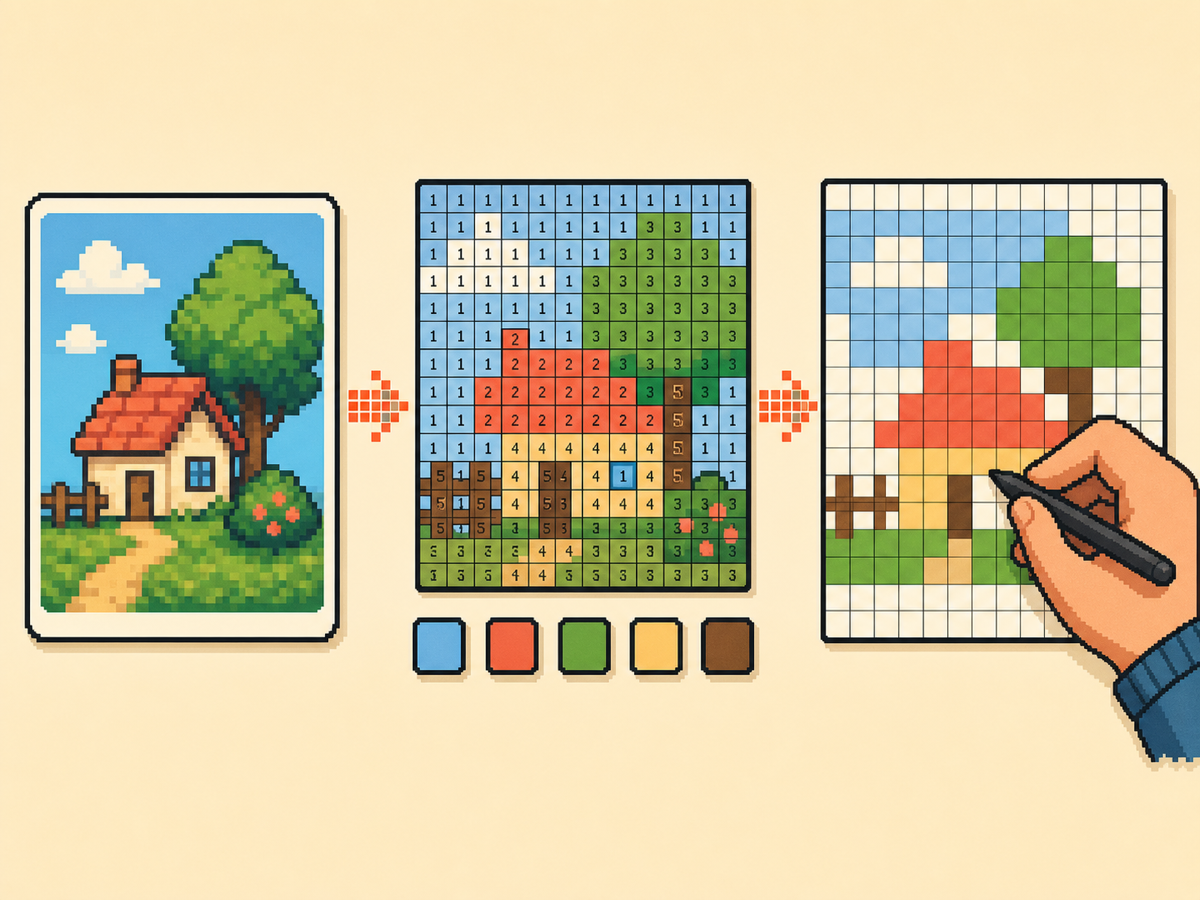
Cómo preparar una creación compartible
- Check whether local play fits. If the other player is nearby and both games are ready, use the official local wireless flow for creations you made on your island. It is the closest in-game sharing path, but it is not an internet upload feature.
- Export a clean visual reference. For online posts, export a PNG grid or plain preview first. This gives people a readable image of the design without needing your original source file.
- Add a numbered pattern. A numbered pattern makes Palette House designs easier to recreate because every cell points to a color number. Include it when the design has many similar shades or small details.
- Include setup notes. Mention the grid size, palette mode, color count, and any manual cleanup you made. Those notes help another player rebuild the design instead of guessing from a screenshot.
- Post to the right community. Use communities that allow fan creations, credit source art when needed, and avoid personal images or content you do not have permission to share.
Opciones y límites para compartir
| Opción | Mejor para | Compensación |
|---|---|---|
| Inalámbrico local | Nearby players exchanging creations inside Tomodachi Life: Living the Dream | Requires both players locally and does not create a public online listing. |
| Referencia de cuadrícula PNG | Posting Palette House designs, custom clothes, posters, food, or object art online | Easy to share, but the receiver still recreates the art manually. |
| Patrón numerado y tarjeta de receta | Detailed designs that need exact colors, row labels, or rebuild notes | More complete, but slower to prepare than a simple screenshot. |
Qué cubre TomodachiShare
TomodachiShare is a separate fan site focused on discovering, uploading, and sharing Mii residents. Living the Grid should not present itself as that service or use the TomodachiShare name as a page target.
Dónde encaja Living the Grid
Living the Grid is useful when the thing you want to share is a custom visual design. It turns source art into Palette House friendly references, numbered PNGs, recipe cards, and share links for your own project state.
Qué incluir en una publicación online
A strong post includes the finished preview, numbered pattern, grid size, palette mode, title, source credit if needed, and a note that the design is meant for manual recreation.
Notas de seguridad y permisos
Do not post private photos, personal information, or uncredited creator work as if it were your own. If a community has rules for custom designs or image uploads, follow those rules before attaching exports.
Errores comunes a evitar
- Calling it an online import. A PNG export is a reference for manual copying. It does not send art into the game or bypass local play.
- Using only a screenshot. Screenshots are good for showing the result, but a numbered grid is much easier for another player to recreate accurately.
- Targeting another site's brand name. Mention TomodachiShare only when explaining the difference. This page should focus on Palette House and creation-sharing workflows.
Guías relacionadas
Preguntas frecuentes
¿Esto es TomodachiShare?
No. TomodachiShare es un proyecto fan separado para descubrir y compartir residentes Mii. Living the Grid se centra en referencias de cuadrícula estilo Palette House, exportaciones PNG, patrones numerados y tarjetas de receta. Visitar TomodachiShare en GitHub
¿Puedo compartir online una creación de Palette House desde el juego?
The official in-game exchange flow is local wireless. For online communities, share screenshots, exported grid references, numbered patterns, or recreation notes rather than claiming there is an official internet upload. Soporte de juego local de Nintendo
¿Cuál es la mejor exportación para otro jugador?
Use a plain preview for quick inspiration and a numbered pattern when accuracy matters. For detailed art, include the recipe card so the grid size and palette choices travel with the image.
¿Puede Living the Grid alojar mi creación?
No. This project does not include accounts, uploads, moderation, or a community database. It helps you prepare assets that you can post on communities you already use.
¿Debo compartir la imagen de origen original?
Only share source art when you own it or have permission. In most cases, the generated grid, finished preview, and credit note are enough for a fan creation post.